AI tools over MCP
Let an assistant watch your containers — safely
An optional Model Context Protocol server lets Claude Code, Claude Desktop and Cursor read your Docker state and perform a deliberately small set of safe actions, as you and never as more than you.
This page answers
- Ask Claude why a container keeps restarting
- Let an assistant restart a stack but never exec into it
- Revoke the token on one laptop only
Off unless you turn it on
The server is not mounted at all without DC_MCP_ENABLED — the routes return a bare 404. Nothing to opt out of.
Two ways to authenticate
A bearer API token from a self-service page, or OAuth 2.1 with PKCE and dynamic client registration for Claude Desktop and Cursor.
A token can only narrow your rights
Every call reuses the app’s RBAC. A token may be restricted to a subset of sections, a subset of hosts, and made read-only — it can never widen what your account can do.
Dangerous verbs are simply absent
No exec or shell, no image export, no file reads, no prune, no remove. Not gated behind a flag — not implemented in the MCP surface.
A ceiling on how fast it can act
Changes are capped per user per minute, so a model stuck in a loop — or a stolen token — is bounded to a few containers rather than your whole estate. Reads are not throttled; only writes are.
Around 25 read tools — including diagnostics and the alerting surface — plus safe control: start, stop, restart a container or a whole stack, deploy or down a project, and a Trivy scan. With MCP resources and prompts. Point Claude Code at it:
# on the server
dockercmd -mcp-enabled -mcp-public-url https://docker.example.com

# on your machine
claude mcp add --transport http docker-commander \
  https://docker.example.com/mcp \
  --header "Authorization: Bearer <your-token>"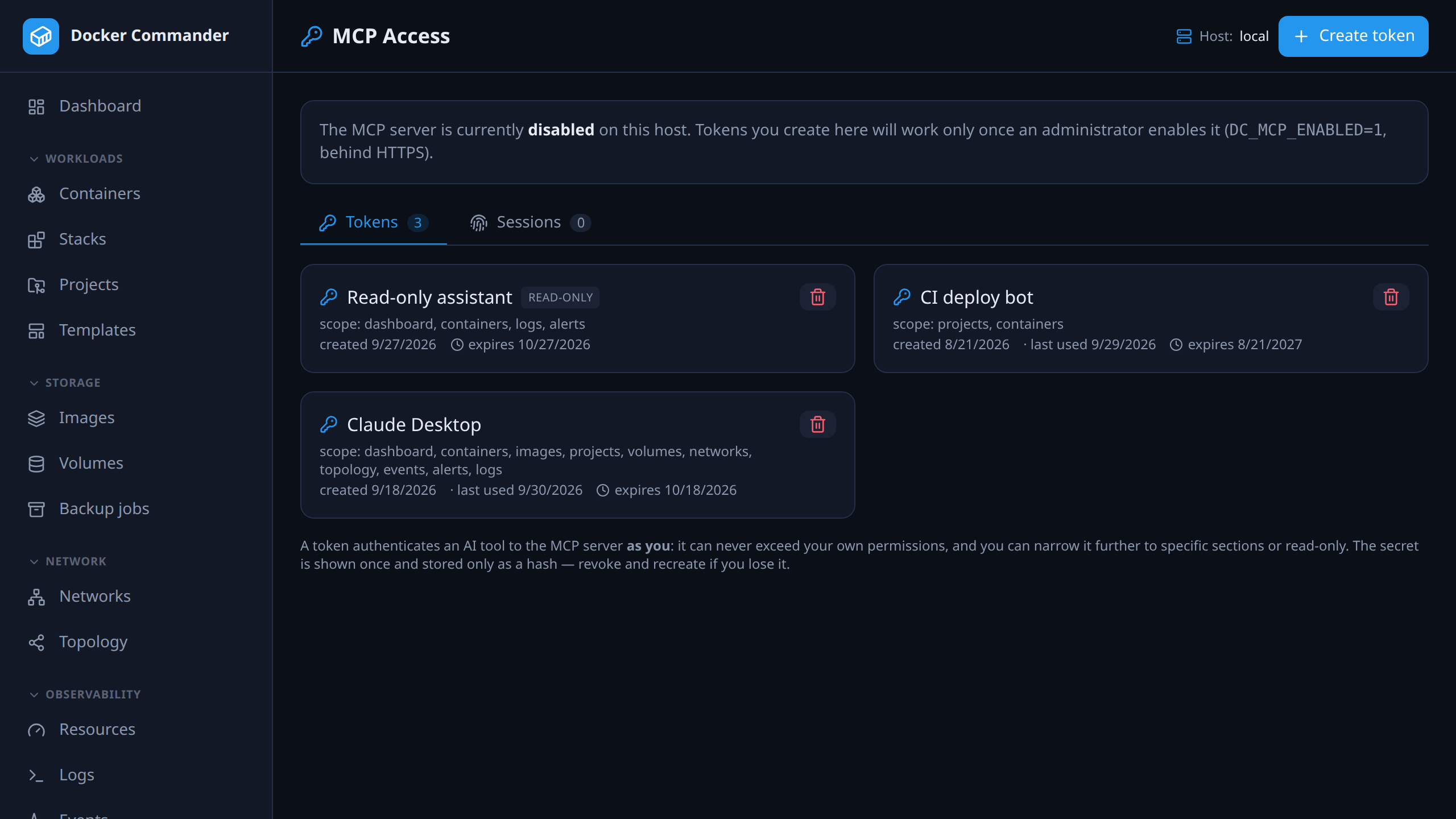
The OAuth server is self-contained (RFC 8414 / 7591 / 8707, PKCE S256, audience-bound and client-bound JWTs, rotating refresh — revoking a client takes effect immediately, not at token expiry) and was exercised with adversarial security tests — alg=none, code and refresh replay, redirect smuggling, CSRF, IDOR.
The complete list
Everything in ai tools over mcp
Opt-in, and narrower than your own account.
- An off-by-default Model Context Protocol server lets Claude Code, Claude Desktop and Cursor monitor and safely operate Docker as you.
- Around 25 read tools — including diagnostics that don’t need a shell (docker top / diff, cross-container log search, the troubleshooting battery) and the alerting surface (history, what’s firing now, rules, delivery, maintenance windows) — plus safe control: start/stop/restart a container or a whole stack, deploy/down a project (including to a remote host), preview a deploy, and a Trivy image scan.
- Bearer API tokens or OAuth 2.1 with PKCE and dynamic client registration; every call reuses the app’s RBAC and a token can only narrow your sections, hosts and rights.
- Each connector session can be revoked on its own — sign out one laptop’s Claude Desktop without touching the others.
- New tokens expire after 30 days by default (admin-configurable), changes are rate limited per user, and every write — scans and diagnostics included — is audited.
- Deliberately no exec, image export, file read, prune or remove.
In the user manual
Try it on one host tonight
It is one binary and a named volume. If you do not like it, delete both — nothing on your Docker hosts was changed to accommodate it.
docker run -d --name dockercmd \
  -p 127.0.0.1:8470:8470 \
  --group-add "$(stat -c '%g' /var/run/docker.sock)" \
  --read-only --tmpfs /tmp \
  --security-opt no-new-privileges \
  --cap-drop ALL \
  -v /var/run/docker.sock:/var/run/docker.sock \
  -v dockercmd-data:/data \
  ghcr.io/koduj-dev/docker-commander:latest
Read-only root filesystem, no added capabilities, no privilege escalation, bound to localhost. On rootless Docker or Docker Desktop, drop the --group-add line.
Show the minimal command
docker run -d --name dockercmd -p 127.0.0.1:8470:8470 \
  -v /var/run/docker.sock:/var/run/docker.sock \
  -v dockercmd-data:/data \
  ghcr.io/koduj-dev/docker-commander:latest
Fewer flags, and correspondingly fewer guardrails. Fine for a throwaway look on a machine you do not mind losing; the hardened form above is what belongs on anything you keep.
MIT licensed · no account · no telemetry · Linux, macOS and Windows