
MCP — remote control from AI tools
Docker Commander can run a Model Context Protocol (MCP) server, so AI tools (Claude Code, Claude Desktop, Cursor, any MCP client) can monitor and safely operate your Docker hosts as you, with the same permissions you have in the UI.
It is off by default. When on, it never exceeds your rights: every call goes
through the app’s RBAC, tokens can only narrow your access, and the tools are
an allow-list of reads + safe control. There is no exec, image export,
volume-content read, prune or remove.
Common tasks
Section titled “Common tasks”Turn it on. Add DC_MCP_ENABLED=1 to the config file
and restart. For the OAuth flow, also set DC_MCP_PUBLIC_URL (see
Enabling it). The startup log confirms the state: MCP server: disabled means it is still off.
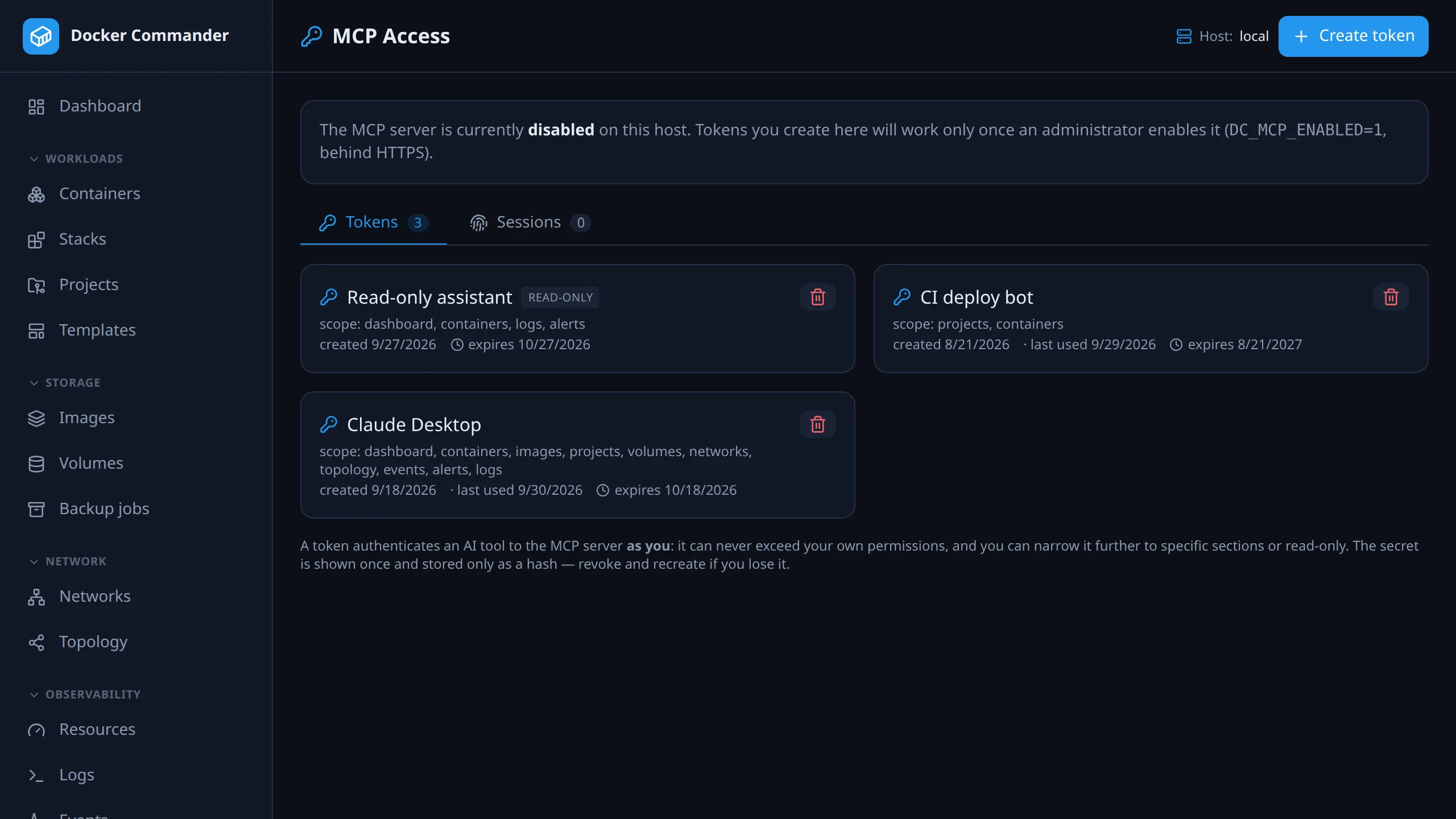
Connect Claude Code (or a script). Open MCP Access, create a token, copy the secret (shown once) and run the command the page gives you:
claude mcp add --transport http docker-commander \ https://docker.example.com/mcp \ --header "Authorization: Bearer <token>"Connect Claude Desktop, claude.ai or Cursor. Needs DC_MCP_PUBLIC_URL. In the
client, add a custom connector / remote MCP server pointing at
https://<your-host>/mcp. A browser opens on the consent screen; pick Allow full
access or Allow read-only. Sign in to Docker Commander in that browser first:
without a session the page only says Sign in first, and you retry the
connection from the tool after signing in.
Let an AI tool look but not touch. Mark the token read-only (or pick read-only on the OAuth consent screen). Restrict it to a few sections if it only needs those, e.g. to review how your stacks are wired.
A token is lost or leaked. The secret can’t be recovered. Revoke it on MCP Access (it stops working immediately) and create a new one.
Disconnect one machine’s connector. On MCP Access → Sessions, revoke that session. Other sessions of the same connector keep working.
See who has MCP access. Admins open Settings → MCP Admin to see and revoke every token, OAuth client and session (below).
Enabling it
Section titled “Enabling it”The server is gated by a config knob and should run behind HTTPS (native TLS or a reverse proxy, see Deployment → HTTPS):
DC_MCP_ENABLED=1# Only needed for the OAuth flow (Claude Desktop / Cursor); bearer tokens work without it:DC_MCP_PUBLIC_URL=https://docker.example.comWhen disabled, the MCP and OAuth routes are not mounted. A request to /mcp is
just an unknown path (it falls through to the SPA, or a plain 404 when no UI is
embedded), with no hint the feature exists.
Authentication
Section titled “Authentication”| Client | Auth | Notes |
|---|---|---|
| Claude Code, scripts, Cursor (header mode) | Bearer API token | Simplest. Create one on the MCP Access page. |
| Claude Desktop, claude.ai, Cursor (connector) | OAuth 2.1 | Needs DC_MCP_PUBLIC_URL. You approve a consent screen in a browser where you are signed in. |
Bearer API tokens (the MCP Access page)
Section titled “Bearer API tokens (the MCP Access page)”Open MCP Access in the sidebar. Each user manages their own tokens.
- Each token has a name, an expiry, and can be restricted to a subset of your sections and/or read-only.
- A token can also be limited to a subset of Docker hosts, but only through
the REST API (
hostIdsonPOST /api/mcp/tokens). The page has no host picker and its cards don’t show a host limit. - Narrowing only subtracts. A token can’t reach a section or host its owner can’t. The owner’s live permissions are re-checked on every call, so if a role is scoped down, older tokens lose that access at once.
- If your account is read-only, every token you mint is read-only too.
- The secret is shown once (only a hash is stored). The page also gives a
ready-to-paste
claude mcp addcommand. - Revoke a token anytime. It stops working immediately.
- Expired tokens drop off this list and off MCP Admin.
OAuth (Claude Desktop / Cursor connector)
Section titled “OAuth (Claude Desktop / Cursor connector)”The client discovers the authorization server, registers itself (dynamic client registration) and opens a browser to Docker Commander’s consent page, where you approve full or read-only access. The page reuses your existing login session, so you must already be signed in there; if not, it says Sign in first and you retry from the tool. The AI client never sees your password.
It is a standard, self-contained OAuth 2.1 server: PKCE, exact redirect matching, audience-bound short-lived access tokens, rotating refresh tokens. No external identity provider is required. An authorization code is valid for 60 seconds, a refresh token for 30 days. A client may register at most 5 redirect URIs, and registration and the token endpoint are limited to 30 requests a minute per IP.
Admin overview (the MCP Admin page)
Section titled “Admin overview (the MCP Admin page)”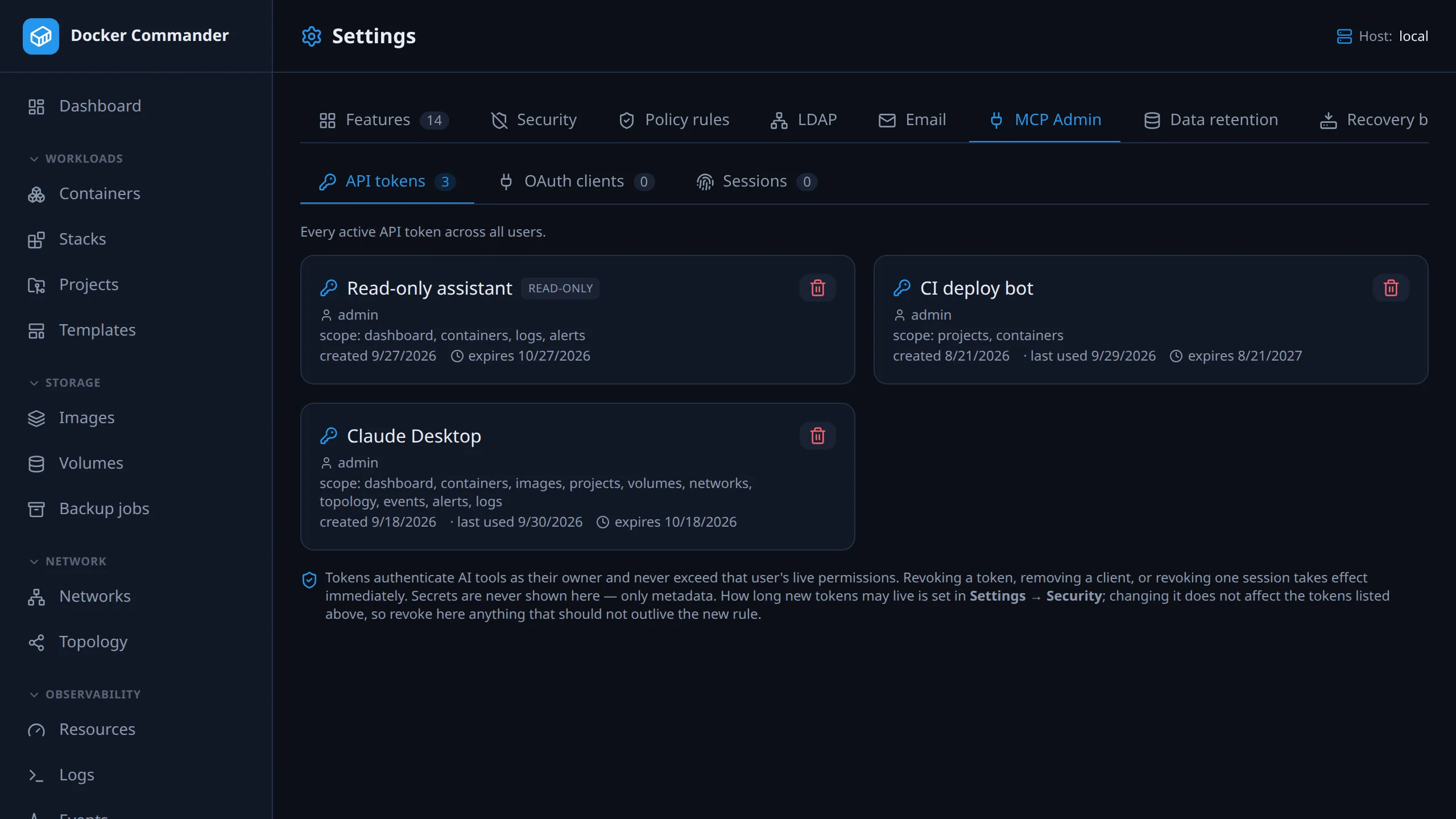
Administrators also get MCP Admin (a tab of Settings, /settings?tab=mcp).
It shows every user’s active API tokens (labelled with the owner), all
registered OAuth clients, and every live connector session. An admin can
revoke any token or session, or remove any OAuth client. Only metadata is
shown; secrets are never recoverable here. One place to audit and cut off MCP
access for the whole instance.
Two levels of revocation:
- Session: one authorized pairing (e.g. “Claude Desktop on my laptop”). Revoking it kills that session’s access and refresh tokens. Other sessions under the same client (the same connector on a second machine) keep working. Self-service for your own sessions (MCP Access → Sessions), or for any user’s from MCP Admin.
- Client: the whole connector registration. Removing it cuts off every session ever authorized through it. Use it when the connector itself is compromised or retired.
Both take effect immediately. An access token is a signed credential, so deleting database rows would not normally reach a copy a tool already holds; it would keep working until it expired (up to 15 minutes). Docker Commander’s access tokens therefore carry the client and the session they were issued to, and every call checks both are still registered. Revoked means now.
Tokens issued before per-session revocation existed carry no session (older ones, no client either), so they can’t be revoked that way. They expire within 15 minutes of the upgrade, or become a tracked session on their next refresh.
What the AI can do
Section titled “What the AI can do”Every tool is listed in the table below. In short:
Read: list hosts, containers, images, volumes, networks and Compose projects; inspect a container (without its environment variables); tail its logs (size-capped); read a compose file; host system info, a stats snapshot, per-container metrics history, recent Docker events and audit entries. Each is gated by its section, per token and user.
Diagnostics, the questions that otherwise push you to open a shell:
- container_processes: what is running inside a container (
docker top). - container_changes: files added, modified or deleted compared with its
image (
docker diff). Paths only, never contents. - search_logs: a string or regex across the containers on a host, for when you don’t know which one to look at.
- run_diagnostics: sanity checks against a host. Overlapping Docker network subnets (with each other and with the host’s real interfaces), a bridge MTU that doesn’t match the host’s default interface, duplicate port bindings, log drivers without rotation, low free disk where Docker stores its data, dangling networks/volumes. Each check reports ok/warn/fail/skipped. The host-network, MTU and disk checks report skipped, not a guess, when the host can’t be probed (no SSH access, or a plain-TCP connection with no shell).
The first three are read-only and bounded, so an assistant can answer “what’s it
doing?” and “what changed?” without exec. run_diagnostics is write-gated
(blocked for read-only tokens/users), because it actively inspects the target host
rather than reading Docker’s own records.
Alerting:
- list_alerts: alert history, filtered by severity, lifecycle kind, host, container, rule and message text. Unlike the feed, it has no unacknowledged only, no repeat hiding and no sort.
- active_alert_conditions: what is over threshold right now, and for how
long. Use this one when diagnosing:
list_alertsanswers “what happened”, and can report a problem that fixed itself an hour ago. - acknowledge_alert: record that a human has seen an alert.
- alert_delivery: whether an alert reached anyone. No attempts means it was never routed anywhere; a failed attempt means nobody was told.
- list_alert_rules: rules and thresholds, so an assistant can tell a real problem from a badly chosen threshold. Shows which channels a rule uses, never the recipients or webhook URL (a webhook URL often carries a token).
- list_maintenance_windows: active/scheduled silences. Delivery is suppressed for their scope while active; events are still recorded.
- create_maintenance_window: start one now, for a duration and an optional scope (host/project/container/rule/severity). A reason is required.
- end_maintenance_window: stop one early. Editing a window’s scope or schedule is UI/REST only.
Safe control (write; blocked for read-only tokens/users):
- start / stop / restart a container.
- acknowledge_alert: changes nothing on the container, but it is attributed, so a read-only principal can’t claim it on someone’s behalf.
- start / stop / restart a whole Compose stack by project name. Prefer the per-container tools when one service is the problem.
- restart_stack_containers / stop_stack_containers: a chosen subset (up to 10) of one stack’s containers, by project name and container ids. Every id is checked server-side to belong to that project; if one doesn’t, the whole call is refused and nothing runs.
- scan_image: a Trivy scan (severity summary plus the most serious findings). A write because it shells out and pulls the image if missing. Reports when Trivy is absent instead of failing.
- deploy / down a managed Compose project.
deployrunsdocker compose up -d --build, like the web UI, so a project withbuild:is rebuilt from its current files. (upalways built a missing image anyway, so this adds no new surface.) Projects on a remote host work too: they need thehostssection plus the per-host scope, as in the UI, and resolve their compose environment the same way. Bind mounts are shipped to the target, binds outside the project folder are refused unless the project opts in, and anything remapped is reported in the tool’s output.
Two related reads:
- preview_deploy: what a deploy would change, without deploying. Services to create, to recreate with a different image, and running ones no longer in the compose file; also reports an invalid compose file. A read on purpose: a read-only token can look before anyone leaps.
- list_managed_projects: the projects this caller may act on. Projects on hosts outside the caller’s scope are dropped rather than erroring, since a project names its host and listing it would disclose that host’s workloads.
The server also exposes MCP resources, data a client can attach as context:
dc://inventory/containers: the container list as JSON (needs containers).dc://compose/{project}: a stack’s compose file, by the namelist_projectsgives (needs projects).
Both read the default (local) host only. And three prompts, canned workflows
that steer the model to the tools above: diagnose_container (argument
container), resource_hogs (no argument; default host) and safe_redeploy
(argument project).
The whole tool list
Section titled “The whole tool list”Every tool, the section that gates it, and whether it is a read or a write. Writes are refused for a read-only token or user, and are audited and rate limited. A token’s section subset narrows this list; its host subset (set over the REST API) decides where each tool may act.
| Tool | Section | R/W | What it does |
|---|---|---|---|
list_hosts |
hosts | R | The hosts this server manages, with their ids |
list_containers |
containers | R | Containers on a host: id, name, image, state, published ports |
get_container |
containers | R | Inspect one container — without its environment variables |
container_logs |
logs | R | The tail of one container’s logs, size-capped |
search_logs |
logs | R | A substring or regex across the containers on a host |
container_processes |
containers | R | What is running inside a container (docker top) |
container_changes |
containers | R | Files added/modified/deleted compared with the image (docker diff) — paths only |
run_diagnostics |
diagnostics | W | Sanity-check battery for a host: network overlaps (incl. vs. host interfaces), MTU mismatch, duplicate ports, log rotation, disk space, dangling resources |
list_images |
images | R | Images on a host: tags, size, age, whether in use |
list_volumes |
volumes | R | Volumes and who mounts them — never their contents |
list_networks |
networks | R | Networks: driver, scope, subnets, attached containers |
list_projects |
projects | R | Compose projects (stacks) discovered on a host |
get_compose |
projects | R | A project’s compose file |
list_managed_projects |
projects | R | The app’s managed projects; hosts out of scope are dropped from the list |
preview_deploy |
projects | R | What a deploy would change — also checks the project’s own host |
stats_overview |
dashboard | R | Host CPU/memory plus a per-container snapshot |
system_info |
dashboard | R | Engine and host facts: versions, OS/kernel, drivers, counts |
metrics_history |
dashboard | R | Historical CPU%/memory% for one container (authorized against the container’s host) |
recent_events |
events | R | Recent Docker daemon events on a host |
recent_audit |
audit | R | Recent audit entries, limited to the hosts the token and its owner may see — most tokens will not have this section |
list_alerts |
alerts | R | Alert history, filtered by severity, kind, host, container, rule or text |
active_alert_conditions |
alerts | R | What is over threshold right now, and for how long |
list_alert_rules |
alerts | R | Rules and thresholds; channels, never recipients or webhook URLs |
alert_delivery |
alerts | R | Whether an alert reached anyone (authorized against the alert’s host) |
acknowledge_alert |
alerts | W | Record that a human saw it, attributed to the caller |
list_maintenance_windows |
alerts | R | Active/scheduled planned-work silences |
create_maintenance_window |
alerts | W | Start a silence now, for a duration and scope |
end_maintenance_window |
alerts | W | Stop a window early |
start_container / stop_container / restart_container |
containers | W | One container’s lifecycle |
start_stack / stop_stack / restart_stack |
containers | W | A whole Compose stack by project name |
restart_stack_containers / stop_stack_containers |
containers | W | Up to 10 of one stack’s own containers, membership verified server-side |
scan_image |
images | W | Trivy scan — a write because it shells out and may pull the image |
deploy_project / down_project |
projects (+ hosts for a remote target) |
W | docker compose up -d --build / down on a managed project. deploy_project also takes profiles and confirm_policy_warnings (see Policy rules) |
Output is capped so a tool can’t become a bulk-export channel:
| Tool | Default | Cap |
|---|---|---|
container_logs |
200 lines | 1000 lines and 64 KiB of text |
search_logs |
500 lines per container | 2000 lines per container, 200 matches, a 200-character pattern |
container_changes |
500 entries | |
list_alerts, recent_audit |
50 entries | 200 |
recent_events |
30 minutes, 100 events | 360 minutes, 500 events |
scan_image |
100 findings (the severity summary still counts all) | |
restart_stack_containers / stop_stack_containers |
10 container ids |
host_id defaults to the local host when omitted. Tools that take a record id
instead (a project, an alert, a container’s metrics) resolve that record’s host and
authorize against it; see the security model below.
What is deliberately missing
Section titled “What is deliberately missing”exec/shell, imagesave/export, reading volume contents or arbitrary files,kill,pruneandremove. An AI token must not become a data-exfiltration or destruction path.- Stack
remove, although the app has it. Force-removing a stack’s containers and networks is destruction, not safe control; do it by hand. A test asserts no destructive verb ever appears in the tool list, so one can’t be added by oversight. - If destructive tools are ever added, the plan is an explicit opt-in the operator enables in the UI: off by default, a separate risky toolset, audited, and limited by both token and role. “The assistant deleted it” should only be possible after somebody decided it could be.
Security model
Section titled “Security model”- RBAC is reused. Every tool maps to a section + read/write and is checked against your live permissions on every request. Disable a section for a user and the matching tool stops working immediately.
- Tokens only narrow. A token’s section subset, host subset and read-only flag apply before your own RBAC and never grant more than you have.
- Tokens expire by default. New tokens last 30 days unless another lifetime is chosen. Never-expiring tokens are off until an admin enables them, and there is a ceiling (a year by default) so nobody sidesteps that by asking for a hundred years. Admins set all three in Settings → Security. The policy governs what may be minted: existing tokens keep their expiry, so tightening it won’t cut off a running integration. Existing never-expiring tokens are listed on MCP Admin and can be revoked there.
- Host scope covers ids, not just arguments. Tools that take a project or alert id resolve its host and authorize against it, and list tools drop rows for hosts the caller can’t reach. Ids are sequential, so knowing one is not access control. A missing object and an out-of-reach one get the same answer, so the tools can’t map what exists elsewhere.
- Secrets are kept out. Container env vars, audit detail and raw event attributes are omitted from tool output; logs are size-capped.
- Off by default, behind HTTPS. Access tokens are signed with a key used only for MCP, separate from the login session secret.
- Audited. Every write that runs is written to the audit log
under your account, failures included: container and stack start/stop/restart,
deploy/down, alert acknowledgements, maintenance windows created or ended,
image scans (
mcp.image.scan) and diagnostics runs (mcp.diagnostics.run). - Changes are rate limited: at most 30 per minute per user, burst of 30 (see below).
- Keep MCP behind a reverse proxy / HTTPS; the OAuth and rate-limited registration endpoints assume it.
- Prefer a read-only token, or one limited to a few sections, when the tool only needs to look.
Technical notes
Section titled “Technical notes”- Why a rate limit. Every other control answers is this allowed; this one answers how much, how fast. A model stuck in a loop and a stolen token both look like an authorized user making many permitted calls. The cap turns “the whole estate stopped” into “a few containers stopped and the audit log is shouting”. The limit is per user, not per token.
- Reads are not limited. They change nothing, and throttling them would push an assistant to act without looking.
- One audit entry per episode. Hitting the ceiling writes one entry, not one per rejected call, so a runaway can’t bury the evidence. Large intentional batches belong in the web UI.
- Subset tools have their own cap. The limit assumes one call is roughly one
container.
restart_stack_containers/stop_stack_containerstherefore take at most 10 ids, all checked to belong to one named project. Without that, one call could act on any number of containers and defeat the limit. - Whole-stack calls are charged per container.
start_stack/stop_stack/restart_stackspend one unit per container the stack has, resolved before the action runs. A 30-container stack costs 30, the same as 30 single calls. - One change, one unit.
deploy_project,down_projectandacknowledge_alertalso check the project’s or the alert’s own host, but that second check spends nothing. - Charging is reserve-or-refuse. A batch that doesn’t fit is refused whole; nothing runs and only the call’s own unit is spent. A batch larger than the burst can never fit, and the refusal says so instead of “wait and retry”.
- No race with deploys. The action runs on exactly the container ids the charge was sized for, not a re-resolved list. A container that joins the project mid-call (a concurrent deploy) is neither charged for nor touched.