Skip to content
  1. 01EditValidating Compose editor, secrets kept out of the file.
  2. 02PreviewEvery service, digest, env and port that would change.
  3. 03PolicyPrivileged, socket, :latest… off, warn or block.
  4. 04DeployLocal or remote host, with your registry credentials.
  5. 05HistoryAn immutable revision with the digests that ran.
  6. 06RollbackRestore validated in staging, swapped atomically.

Deploy preview and drift detection

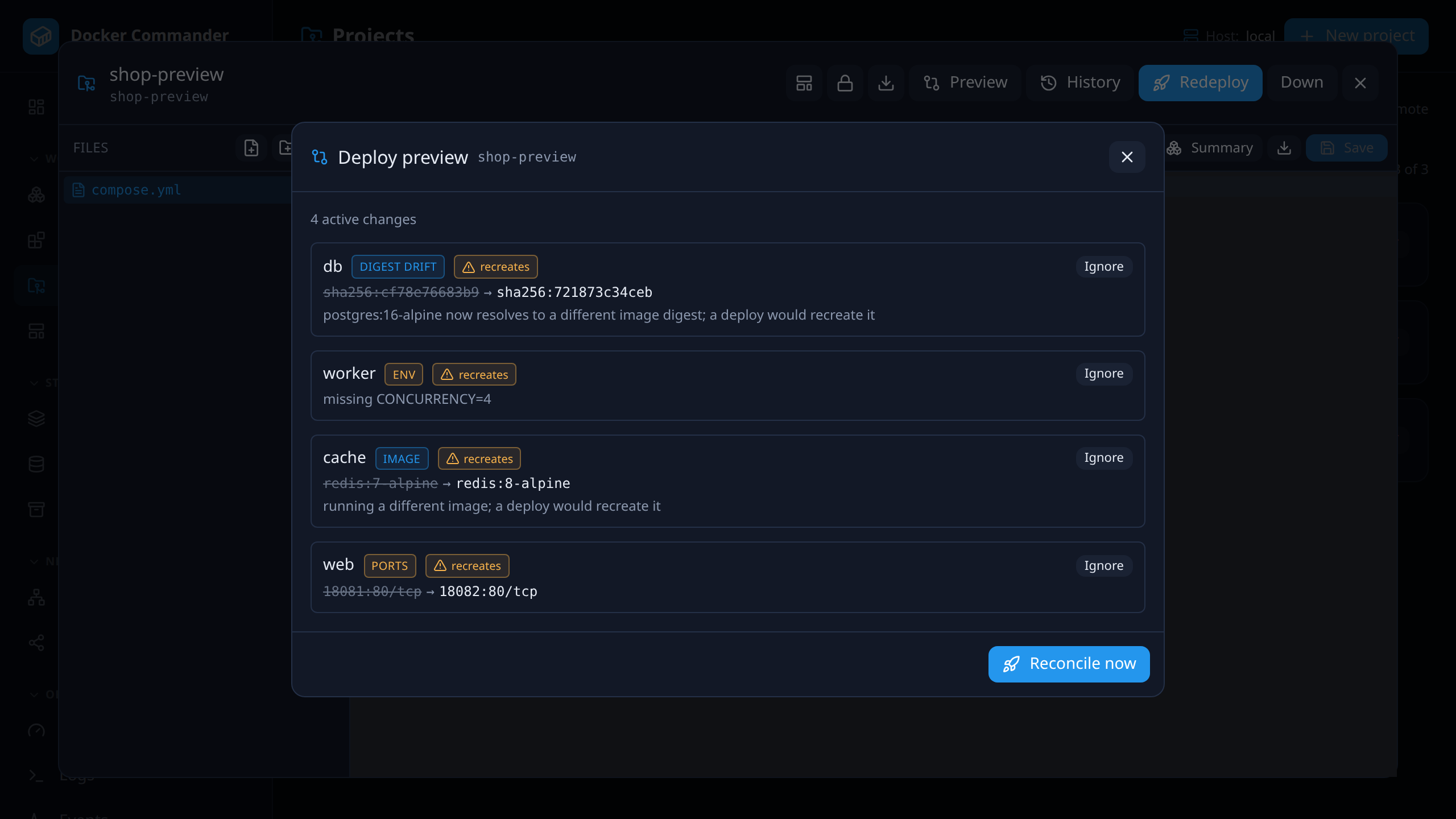
Before a deploy, Preview lists every service that would be added, recreated or orphaned; image and registry-digest changes (a :latest that moved upstream is caught even though the tag did not); and env, port, volume, network, restart, limit and healthcheck differences — each flagged with whether it recreates the container. The same view is drift detection: review a difference, ignore it for exactly that service and value, or Reconcile now.
127.0.0.1:8470
The deploy preview: four active changes — digest drift, a missing env variable, an image change and a port change — each marked “recreates”, with Ignore buttons and Reconcile now.

Every deploy is a revision you can go back to

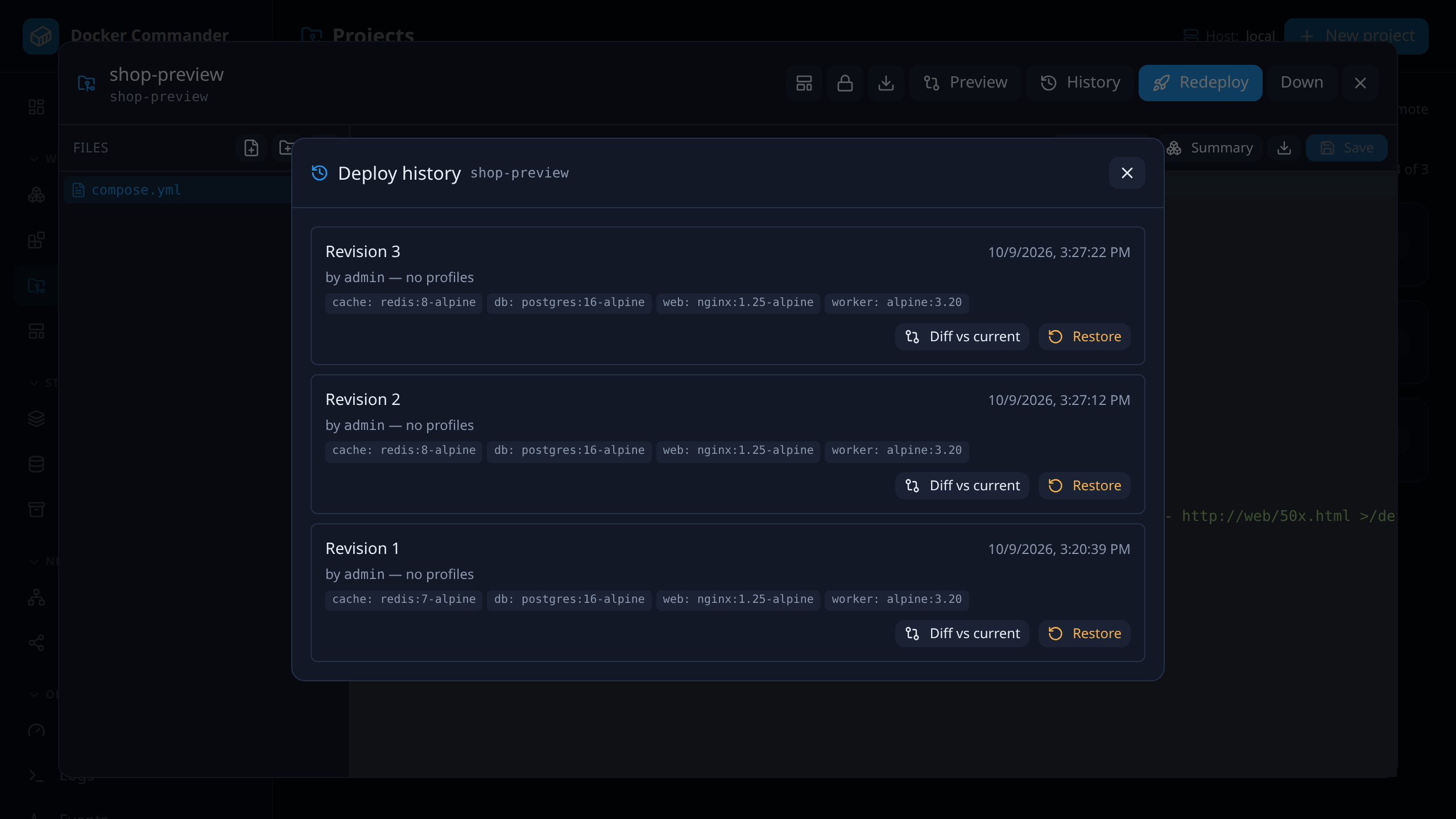
Each successful deploy records the compose file and every sidecar file, profiles, target host, the image and the digest actually running per service, author and reason. Diff any two revisions or a revision against what runs now. Restore validates the old snapshot against a staging copy and swaps it in atomically — a failure at any step puts back exactly what was there.

127.0.0.1:8470
Deploy history: three revisions with author, time and image per service, each with Diff vs current and Restore.

Policy rules before anything is written

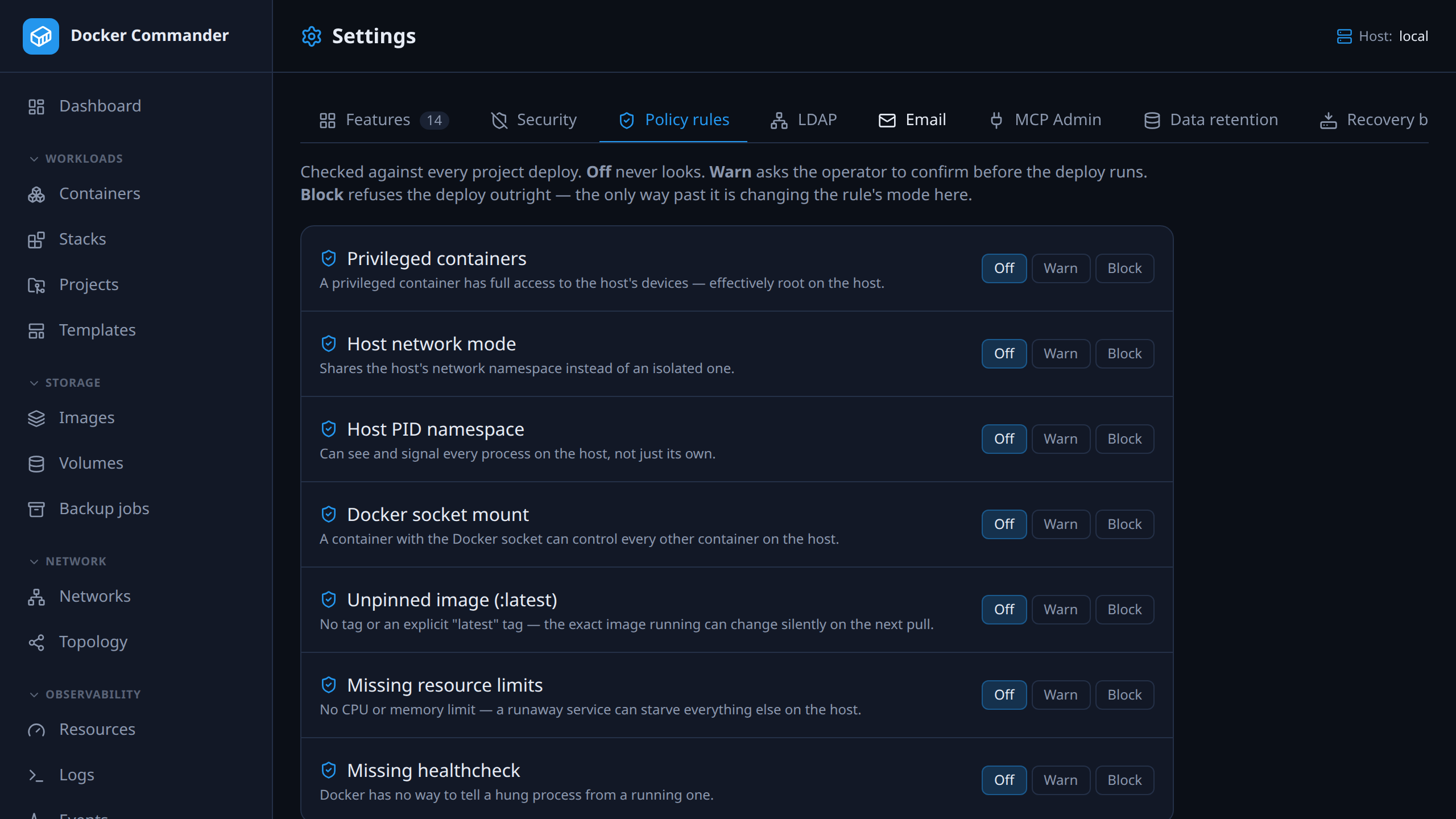
Seven deploy-time rules — privileged containers, host network or PID namespace, a Docker socket mount (including through a parent directory), an unpinned image, missing resource limits, missing healthcheck — each off, warn or block. Warn asks for a confirmation, block refuses with no per-deploy override, and nothing reaches the target host until the check has passed.

127.0.0.1:8470
The policy rules settings: each rule with an off, warn or block choice.

Secrets that never touch the disk

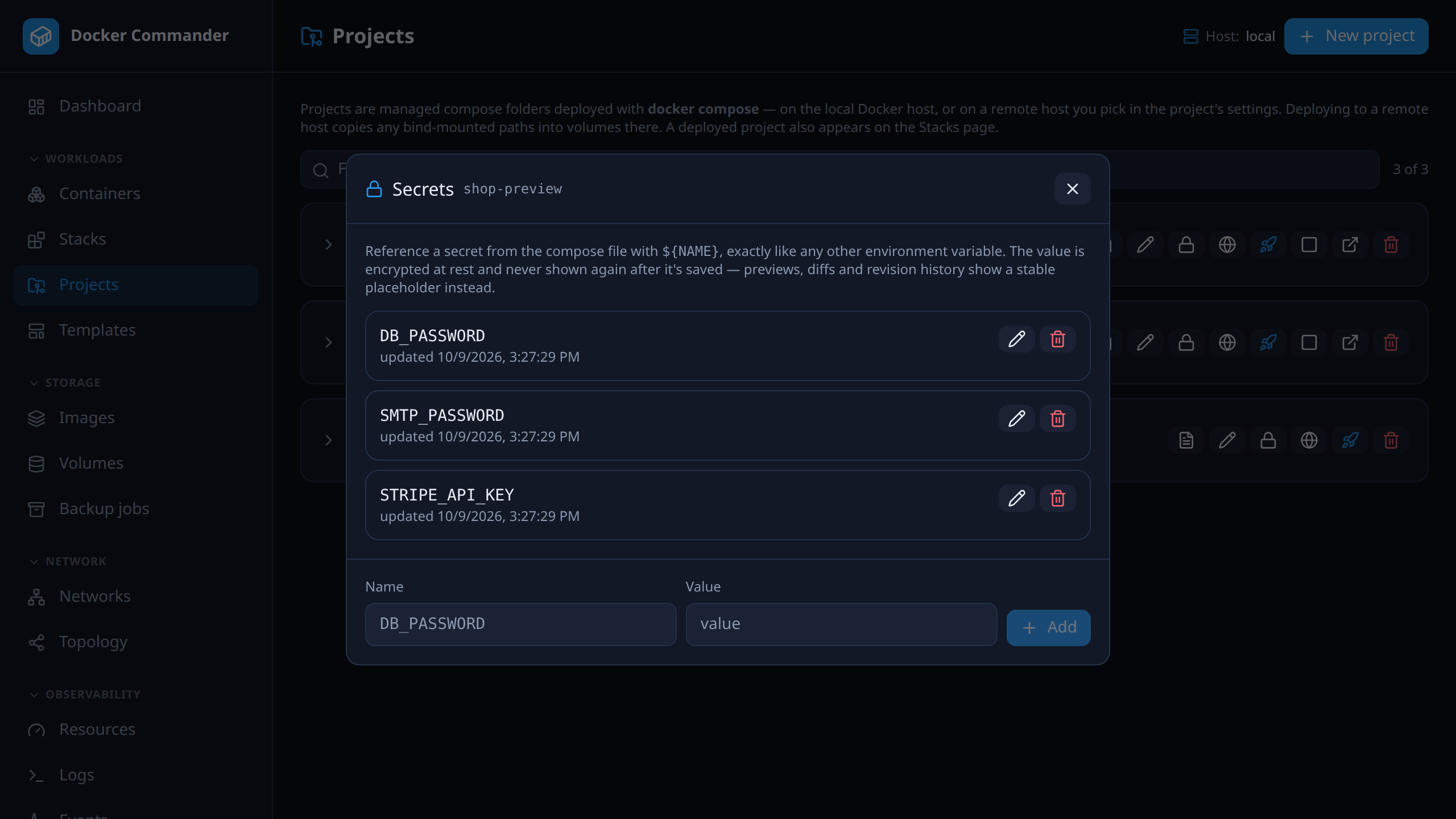
Name a value once and reference it as ${NAME} from the compose file. It is encrypted at rest, handed to compose as an environment variable at deploy time only, can be replaced but never read back, and shows up in previews and diffs as a stable secret:<fingerprint> — so you can see that it changed without seeing what it is.

127.0.0.1:8470
A project’s secrets: names with masked values and replace and delete actions.

A domain and a certificate per service

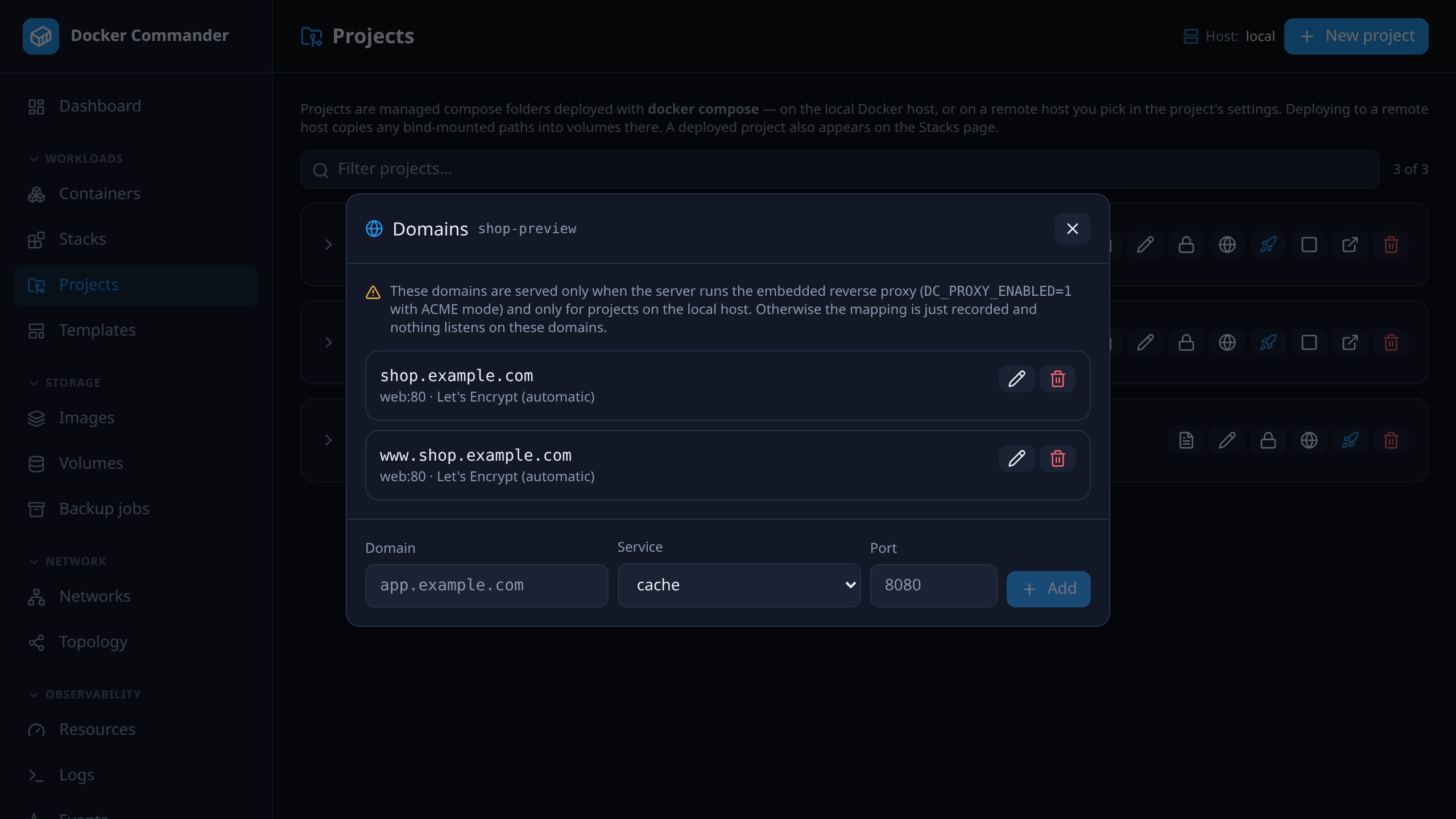
Map app.example.com to one of a project’s services. With the opt-in embedded reverse proxy, each mapped domain gets its own Let’s Encrypt certificate and is routed — on the same listener as the admin UI — to the container Docker reports as actually running. Local-host projects in this release.

127.0.0.1:8470
A project’s domain mappings: hostname, target service and port.

The complete list

Everything in compose & safe deploys

Preview, policy, deploy, history, rollback.

  • Managed project folders edited in a built-in CodeMirror editor with live inline validation: compose (anchor and ${VAR} aware), Dockerfile via docker build --check, YAML / JSON / .env.
  • Resolved preview, services and ports summary, templates, schema-aware Compose autocomplete, and image or tag suggestions from local images, Docker Hub and your private registries.
  • Deploy through the docker compose CLI with profiles and .zip import / export — to the local daemon or a remote host, where each bind mount inside the project folder is copied into a named volume on the target.
  • Deploy preview: services added, recreated or orphaned, image and registry-digest changes, env (with values), ports, volumes, networks, restart policy, limits and healthcheck — each flagged when it recreates the container.
  • Drift detection on the same engine: ignore a difference scoped to service, kind and value, unignore it, or Reconcile now with a fresh pull. A successful deploy clears the ignores.
  • Deployment revisions: immutable history with diff between any two revisions or against what is running, and a restore that validates in staging and swaps atomically — volumes seeded on a remote host are saved and put back if it fails.
  • Policy rules (privileged, host network/PID, Docker socket, unpinned image, missing limits, missing healthcheck), each off / warn / block, checked before anything is written to the target host — for the UI, the REST API, MCP and restores alike.
  • Project secrets: encrypted at rest, injected as environment at deploy time only, never written to .env or a revision snapshot, shown as a redacted fingerprint everywhere.
  • Domain mappings per service, served by an opt-in embedded reverse proxy with an ACME certificate per domain (local-host projects).
  • Image update detection: every 6 hours each running service is checked against what the registry now serves for its tag, and a new digest raises an alert once.
  • Deploys pull private images with the credentials stored under Registries, and a project runs one operation at a time — a second deploy, restore or save is refused instead of racing.
  • Compose stacks created from the CLI are discovered by label: start, stop, restart, remove, and edit the file in place and redeploy. A stack that belongs to a Project opens read-only, so nothing bypasses its revisions and policy.

In the user manual

Try it on one host tonight

It is one binary and a named volume. If you do not like it, delete both — nothing on your Docker hosts was changed to accommodate it.

Docker Commander v1.7.2 — Docker, hardened
docker run -d --name dockercmd \
  -p 127.0.0.1:8470:8470 \
  --group-add "$(stat -c '%g' /var/run/docker.sock)" \
  --read-only --tmpfs /tmp \
  --security-opt no-new-privileges \
  --cap-drop ALL \
  -v /var/run/docker.sock:/var/run/docker.sock \
  -v dockercmd-data:/data \
  ghcr.io/koduj-dev/docker-commander:latest

Read-only root filesystem, no added capabilities, no privilege escalation, bound to localhost. On rootless Docker or Docker Desktop, drop the --group-add line.

Show the minimal command
Docker — minimal
docker run -d --name dockercmd -p 127.0.0.1:8470:8470 \
  -v /var/run/docker.sock:/var/run/docker.sock \
  -v dockercmd-data:/data \
  ghcr.io/koduj-dev/docker-commander:latest

Fewer flags, and correspondingly fewer guardrails. Fine for a throwaway look on a machine you do not mind losing; the hardened form above is what belongs on anything you keep.

MIT licensed · no account · no telemetry · Linux, macOS and Windows