
Policy rules
Checks that run on a Project before it is deployed. Each rule looks for one risky setting in the Compose model and is set to Off, Warn or Block.
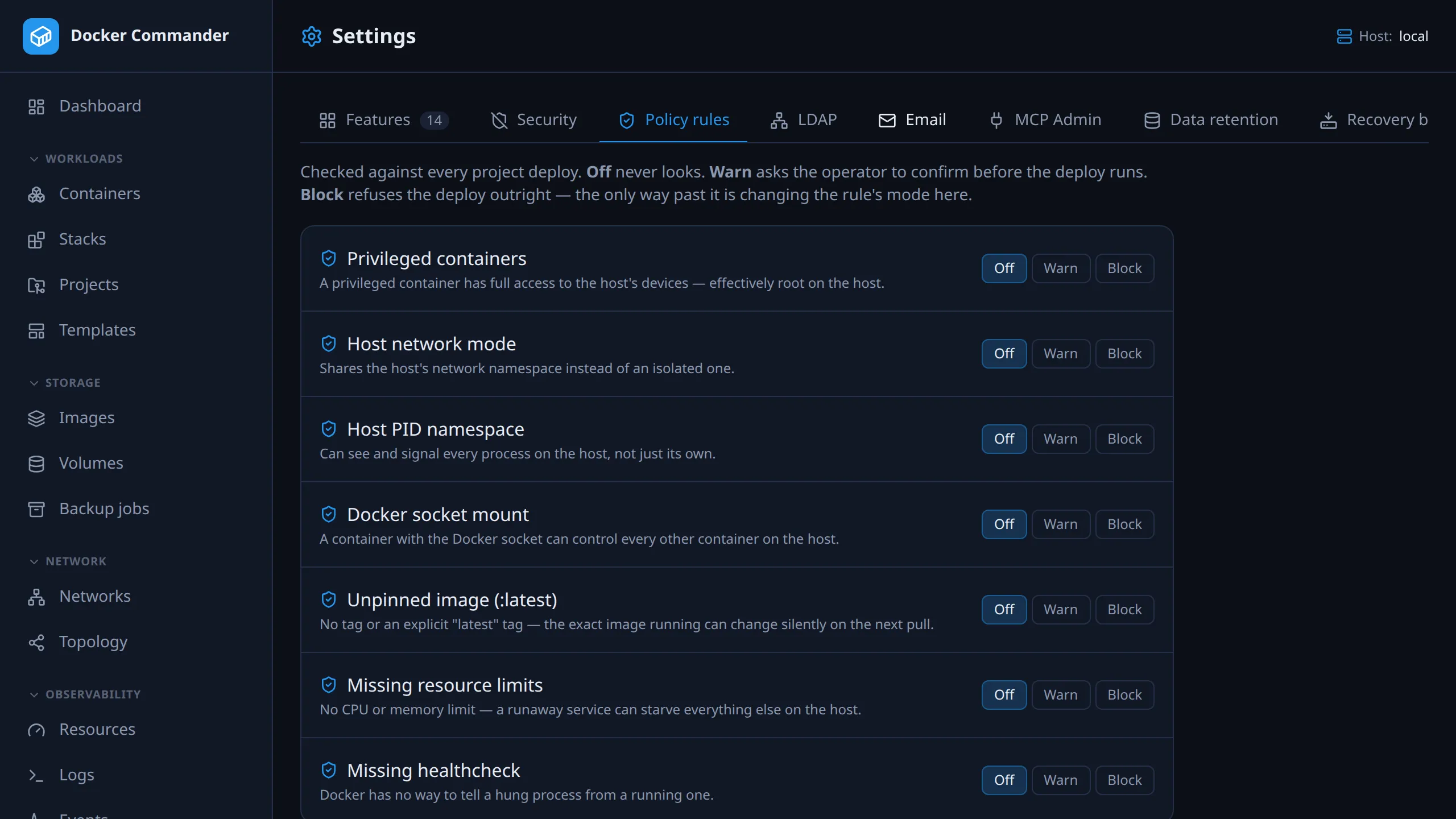
Find them under Settings → Policy rules (/settings?tab=policy). Admin only.
Common tasks
Section titled “Common tasks”Warn when someone deploys :latest. Set Unpinned image (:latest) to
Warn and press Save policy rules. A deploy with an untagged or latest
image now asks for confirmation first, and the confirmation is audited.
Never allow privileged containers. Set Privileged containers and Docker socket mount to Block. Such a deploy is refused outright, with no override, until the project is fixed or the rule changed.
Find out who deployed past a warning. Search the audit log for
project.deploy.policy_warn_ack. Each entry names the project and the
rule:service pairs.
The rules
Section titled “The rules”| Rule | Triggers when a service… |
|---|---|
Privileged containers (privileged) |
sets privileged: true |
Host network mode (host_network) |
uses network_mode: host |
Host PID namespace (host_pid) |
uses pid: host |
Docker socket mount (docker_socket_mount) |
bind-mounts the Docker socket (see below) |
Unpinned image (:latest) (latest_tag) |
uses an image with no tag or the latest tag, and no digest |
Missing resource limits (missing_resource_limits) |
has no CPU or memory limit |
Missing healthcheck (missing_healthcheck) |
has no healthcheck, or disables it |
Rules are checked per service, so two offending services give two violations.
- Unpinned image:
nginxandnginx:latestare unpinned,nginx:1.27is pinned. A@sha256:…digest counts as pinned even with a tag. A registry port (registry:5000/app) is not read as a tag. - Resource limits:
deploy.resources.limits, or service-levelcpusormem_limit, satisfies the rule. - Healthcheck:
healthcheck: {disable: true}counts as none.
The three modes
Section titled “The three modes”| Mode | Effect on a deploy |
|---|---|
| Off | Not checked. The default for every rule. |
| Warn | The deploy pauses for confirmation: “Deploy has policy warnings” lists each rule, service and reason. Deploy anyway runs it and is audited. |
| Block | “Deploy blocked by policy”. Nothing starts and there is no per-deploy override. Fix the project or have an admin change the mode. |
Pick a mode per rule and press Save policy rules. If the current rules fail to load, the page shows an error and saving is disabled. If the stored rules are unreadable (corrupt), the page shows a banner, every rule as Off, and lets you save; saving replaces them. If every rule is Off, deploys skip the check.
The check runs before anything changes. On a remote host no files are shipped until it passes. On a restore no project files are replaced.
Where the rules apply
Section titled “Where the rules apply”- Deploy from the UI or the REST API.
- Restoring a revision from the deploy history. Files are checked in a
staging copy first, so a refused restore leaves the project unchanged. Under
Warn the dialog lists the rules and asks first, like a deploy (Restore
anyway). The REST API takes
confirmPolicyWarnings. - MCP, the
deploy_projecttool. Block refuses. Warn refuses once, asking to retry withconfirm_policy_warnings=true. See MCP.
Not covered: containers created by hand in the UI, anything started outside Docker Commander, containers already running when you change a rule, and the read-only deploy preview.
If the check itself fails
Section titled “If the check itself fails”- If the stored rules can’t be loaded, the deploy is refused. If they are
unreadable (corrupt, including a stored
null), every deploy is refused with “the stored policy rules are unreadable; open Settings → Policy rules and save them again” until an admin saves them. - If the Compose model can’t be resolved and any rule is on Block, the deploy is refused with “policy check failed; refusing to deploy for safety”.
- If it can’t be resolved and every active rule is Warn, the failure is logged and the deploy goes ahead.
Changing the rules is audited as policy.rules.update. Deploys record:
| Situation | Deploy | Revision restore |
|---|---|---|
| Refused by a Block rule | project.deploy.policy_block |
project.revision.restore.policy_block |
| Warn confirmed | project.deploy.policy_warn_ack |
project.revision.restore.policy_warn_ack |
| Check itself failed | project.deploy.policy_check_failed |
project.revision.restore.policy_check_failed |
Each entry names the project and lists the rule:service pairs. A deploy
through MCP is recorded as mcp.project.deploy, also when refused, without the
policy actions.
Technical notes
Section titled “Technical notes”- Which model is checked. The rules run on the resolved Compose model, the
output of
docker compose config: variables filled in, files merged, and this deploy’s profiles applied. A violation in a profile you aren’t deploying is not reported. - Docker socket check. Only bind mounts are inspected. One is flagged when
its source or target ends in
docker.sock; its source is/; its source is a parent of/var/run/docker.sockor/run/docker.sock(such as/var,/var/runor/run); or its source is a rootless runtime directory (/run/user,/run/user/<uid>, or the same under/var/run). Paths are normalised first, so/var/run/../run/docker.sockis caught. A socket under a name that doesn’t end indocker.sockis not detected.