
Alerts
Rules that watch your containers and notify you by webhook or e-mail. The engine runs on the server and watches all configured hosts around the clock, whether or not anyone has the UI open. The SMTP relay is set up by an admin under Settings → Email; rules only opt into e-mail here. Webhooks are also added by an admin; anyone with the Alerts section can then pick one for a rule.
Common tasks
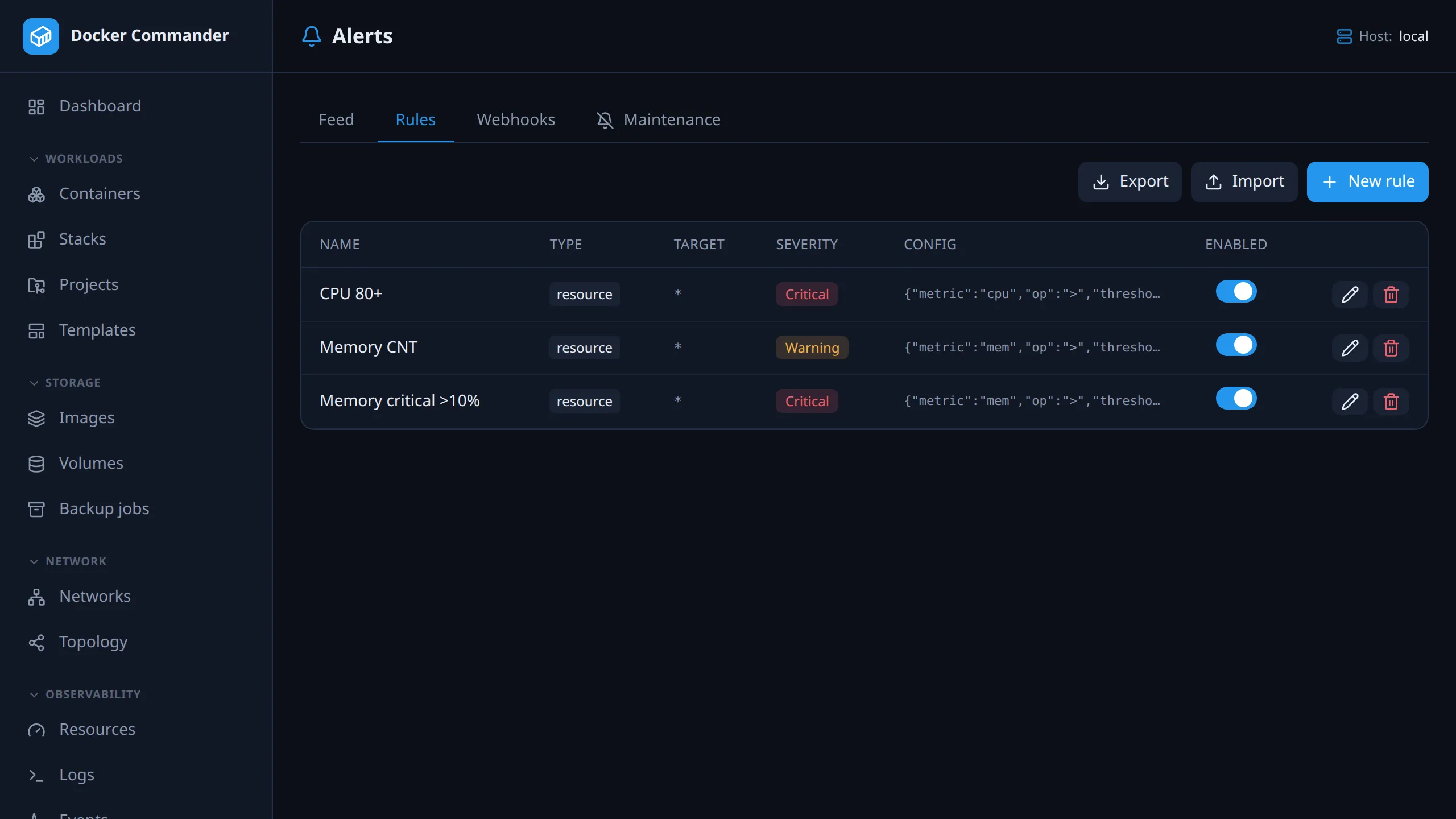
Section titled “Common tasks”Alert when a container uses more than 80% CPU for 30 seconds. On Rules,
add a Resource threshold rule: metric CPU % (of all cores), above
80, for 30 seconds, then pick a webhook or tick Also send an email.
Avoid of one core here: a container busy on four cores reads ~400% there, so
80% fires almost constantly.
Alert on a log line. Add a Log pattern rule, e.g. ERROR|panic with
Treat as regular expression ticked (otherwise it is a substring match). The
Cooldown keeps a noisy container from sending one alert per line.
Catch a crash loop. Add a Restart / crash loop rule, e.g. 3 restarts within 60 seconds. Target narrows it to container names containing a string; blank watches everything.
Post alerts to Slack or Discord. On Webhooks, add the endpoint URL and,
if the service needs its own format, a body template such as
{"text":"[{{.Severity}}] {{.Container}}: {{.Message}}"}. Then select the
webhook on each rule. The payload doesn’t say which host fired, so route per
host by e-mail instead.
Silence alerts during planned work. On Maintenance, create a window scoped to the project or host, with a duration and a reason. Alerts are still recorded; only webhook and e-mail stay quiet. Deploys open a short window on their own.
Check that an alert reached anyone. Click the alert’s row to see every webhook call and e-mail with its outcome. Temporary failures are retried up to 5 times.
Tabs: Feed (fired alerts), Rules, Webhooks, Maintenance. Rules can be created, edited, enabled/disabled, deleted, exported and imported. Webhooks can only be added and deleted, by an admin; to change one, add a new one and switch the rules over.
A webhook URL usually carries its credential (a Slack or Discord token in the
path, an Authorization header), so once saved it never comes back, not even
to an admin. The list shows each webhook’s name, method, host and header names,
and the audit log records only the host. A webhook decides where the server sends
requests, and the first bytes of each reply are kept on the alert. That’s why only
an admin can add one: from an Alerts grant it would reach internal services and
read their answers.
| Type | Fires when |
|---|---|
state |
A container emits a lifecycle event: die, kill, oom, stop, unhealthy. |
resource |
CPU %, memory % or network RX/TX rate crosses a threshold for N seconds. |
log |
A log line matches a substring or regex. |
restart |
A container restarts too often within a window (crash loop). |
network |
Dropped packets or interface errors increase by at least N within a window. |
Each rule has a target (container-name substring; blank or * = all), a
severity, a cooldown (the re-notify interval: how long a condition stays
quiet while still true), and optional webhook and e-mail delivery.
A new rule starts at severity warning and a 60-second cooldown. The type
fields start at: resource CPU % (of one core) above 80 for 30 seconds;
restart 3 within 60 seconds; network an increase of 1 within 300
seconds. A rule created over the API or by import with these fields left out
is evaluated with the same values (resource metric of one core, 30 seconds).
What the percentages mean:
| Metric | Meaning |
|---|---|
| CPU % (of one core) | Docker’s own figure, as in docker stats. 100% is one core, so four busy cores read ~400%. A fixed > 80% rule is over threshold almost always on a multi-core host. |
| CPU % (of all cores) | The same divided by the host’s core count: 0–100% on any machine. Usually what people mean. |
| Memory % | Share of the container’s limit, not of host RAM. |
Older rules keep the of one core meaning, so nothing changes under them.
Messages state their basis with absolute values:
MEM 3.0 GiB / 5.0 GiB (61.9% of limit) > 5% for 30s.
The two network rules answer different questions.
resourceon RX/TX rate: a plain threshold, “is the rate above or below N MiB/s for N seconds”. It reads the same live per-poll rate the dashboard shows. Entered in MiB/s (1 MiB = 1024 × 1024 bytes), stored as bytes/s. Alert messages state sizes the same way:KiB,MiB,GiB.networkon drops/errors: fires on the increase within a window, never the absolute counter. Drops that have sat at a high total since last month are not an incident; packets being lost right now are. Drops and errors are each counted RX+TX combined, as elsewhere in the app.
Threshold alerts: firing to resolved
Section titled “Threshold alerts: firing to resolved”A resource rule describes something that is either true or not, so it is
tracked as a condition with a lifetime. There is one condition per
container + metric, not per rule, and you hear about it only when it
changes:
| Event | Meaning |
|---|---|
firing |
Threshold crossed and held for the rule’s duration. |
escalated |
Still on, and a more severe rule now applies. |
eased |
Still on, but only a less severe rule still applies. |
repeat |
Still on, and the cooldown elapsed. |
resolved |
It stopped. The event says how long it lasted. |
- Overlapping rules give one alert. Over both a warning > 5% and a critical > 10% memory rule is one fact; the most severe rule speaks for it. Crossing into critical later escalates the same condition, so the incident clock keeps running.
- Silence means unchanged, not unchecked.
state, log, restart and network rules are edge-triggered: a death,
a matching line or a counter that grew never stops being true later. They use
the plain cooldown and never resolve.
The feed
Section titled “The feed”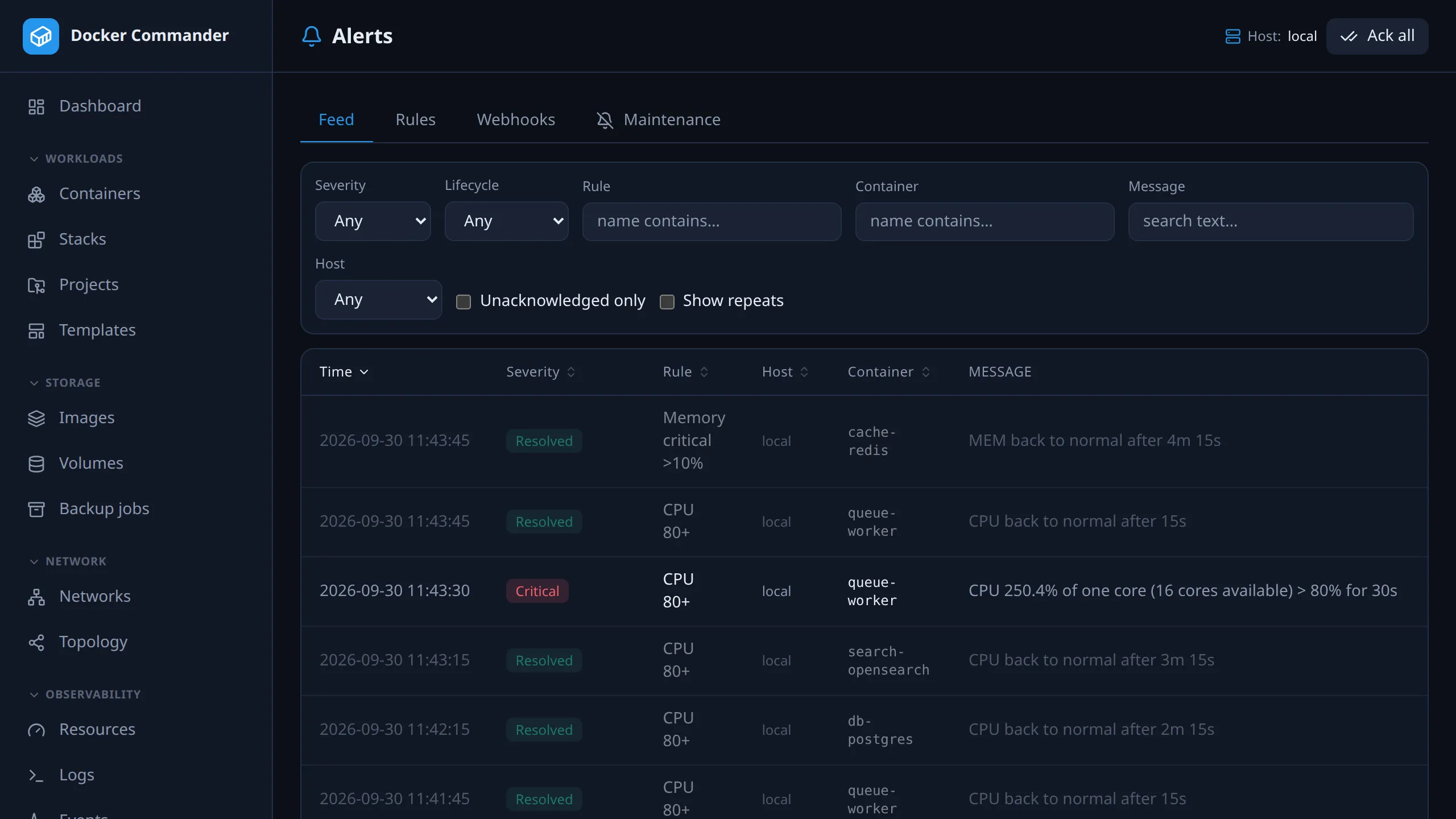
Paged 50 at a time. Filter by severity, lifecycle kind, host, rule, container, message text and unacknowledged only; sort by any of the first five columns. All of it runs in the database, so counts and order cover the whole result, not the visible page. Severity sorts by importance, not alphabetically.
Repeats are hidden by default, because they would bury firing and
resolved. Tick Show repeats or pick repeat in the lifecycle filter. The
choice is saved per account.
The row that started a condition shows still firing · 27m (counted from the start, also after an escalation) and ↻ 12, the number of repeats, with the last one’s time in the tooltip. Only threshold conditions have these. Repeats silenced by a maintenance window are not stored, so the count is lower during a window. Other flags: ↗ escalated, ↘ eased, and a crossed-out bell for silenced.
Acknowledging records who and when. Ack all (page header) acknowledges
everything matching the current filters, not the whole table, and its confirm
says which. A resolved event is stored already settled: no Acknowledge
action, never outstanding, never in the badge.
The sidebar badge counts unacknowledged warnings and criticals only.
Endings are recorded as info, so the number never grows because something got
better. Info alerts still show in the feed and its totals.
Toasts announce new alerts on any page while the app is open. Resolved ones are green, a countdown bar shows the time left, and hovering pauses it. Turn them off under Profile → Preferences; alerts are still recorded, counted and delivered. Silenced events don’t toast but stay in the feed. The feed, badge and toasts share one poll, so a row never appears before its toast.
Retention: events and delivery records are deleted after 90 days by default; see Settings → Data retention.
Alert detail
Section titled “Alert detail”Click a row for the full message, measured value, duration (or time firing and repeat count), host, a link to the container, who acknowledged it, and every delivery attempt with the endpoint’s response. You can acknowledge it there too.
Delivery
Section titled “Delivery”Each webhook call and e-mail send is recorded against the alert. Click Delivery to see them:
delivered EMAIL [email protected] 2026-07-31 13:02:11failed WEBHOOK ops (hooks.example.com) HTTP 500 — upstream unavailableA webhook returning 500, a refusing SMTP server, or e-mail ticked with no recipient configured anywhere all show here as failures.
- Only the webhook’s name and host are stored, never the full URL, which often carries a token. This record is readable by anyone with the alerts section.
- Response bodies are truncated to 500 bytes before they are stored, so a remote server can’t write unbounded text into the database.
Retries. Transient failures are retried; configuration problems are not.
| Retried | Webhook timeout, unreachable, or 429/5xx. A failed e-mail send. |
| Not retried | Any other webhook 4xx (bad payload or auth won’t fix itself). SMTP not configured. No recipient anywhere. |
| Backoff | Up to 5 retries at 1, 2, 4, 8, 16 minutes (about half an hour), then it gives up. |
Each attempt adds a row to the same Delivery list. A retry due inside a maintenance window waits it out, without using up one of its 5 attempts.
Webhooks
Section titled “Webhooks”Any HTTP endpoint: Slack, Discord, Grafana, n8n… The optional body is a Go
template over {{.RuleName}}, {{.Type}}, {{.Severity}}, {{.Container}},
{{.ContainerID}}, {{.Message}}, {{.Value}} and {{.Time}} (RFC 3339,
UTC). Without a template, those fields are sent as JSON; value is omitted when
there is no measurement.
The payload does not carry the host or the lifecycle kind
(firing, resolved…), except as far as the message says. Per-host routing
exists for e-mail only.
Who receives an alert e-mail
Section titled “Who receives an alert e-mail”A rule with Also send an email uses the first of these that is set:
- The rule’s own recipients (comma-separated).
- The host’s alert e-mail, set on Hosts.
- The instance-wide recipient, To under Settings → Email.
Rules older than per-rule recipients have an empty list, so they use 2 or 3.
The alert e-mail on your account (Profile, the icon beside Sign out)
prefills the recipients the first time you enable e-mail on a rule; clear it to
use the instance-wide address. An LDAP mail attribute fills it on login. A
directory without an address never clears one you set by hand.
Maintenance windows
Section titled “Maintenance windows”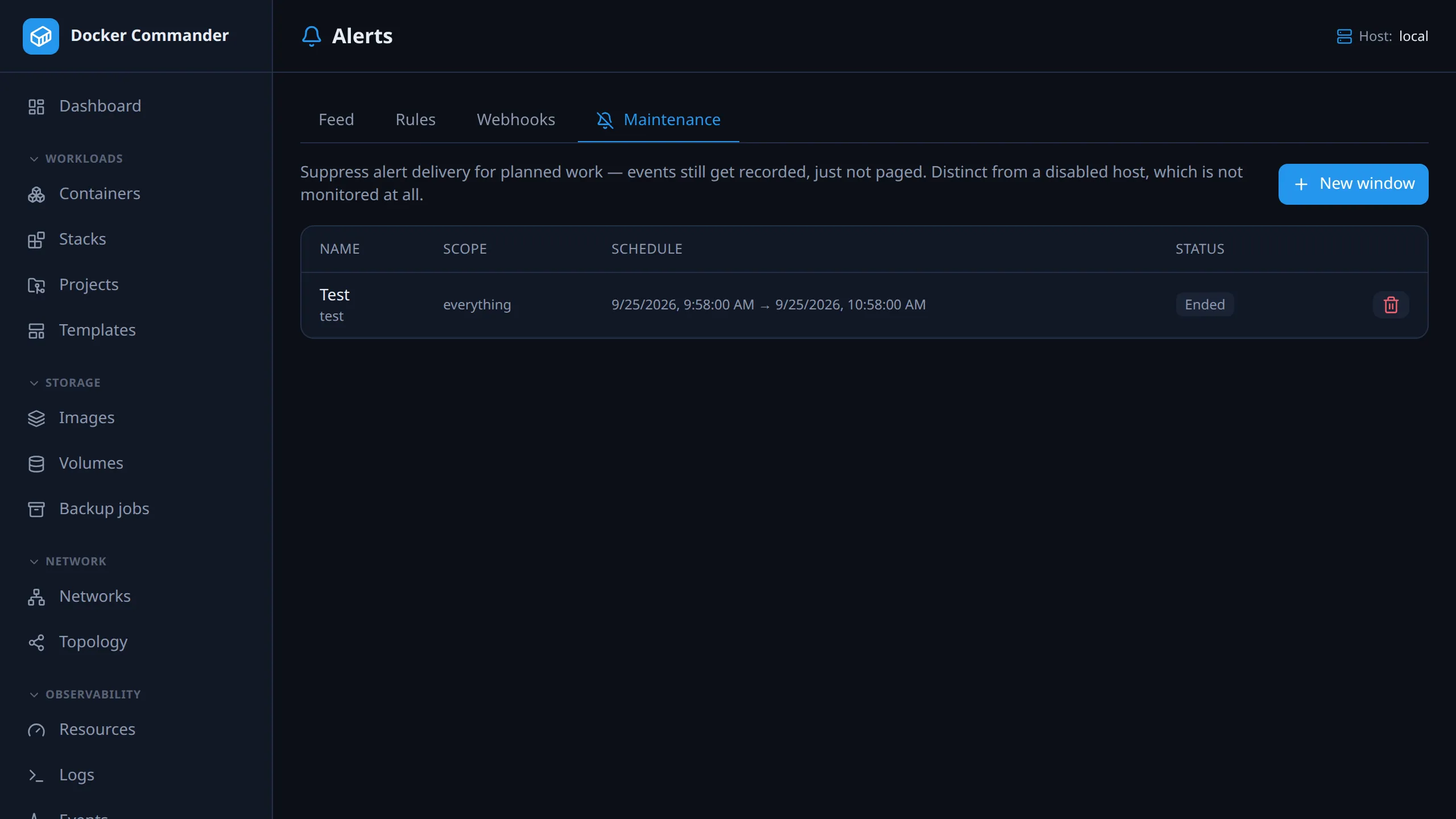
A window stops delivery (webhook and e-mail) for planned work. Alerts still fire and are recorded, with a crossed-out bell. A disabled host is different: the engine doesn’t watch it at all.
Scope. Blank means no restriction, so an all-blank window silences everything. A blank Hosts field needs access to all hosts: a user limited to some hosts must pick hosts, or the window is refused.
| Field | Matches |
|---|---|
| Hosts | One or more Docker hosts. |
| Project | Compose project (stack) name, substring. |
| Container | Container name, substring. |
| Rule | One rule, or any. |
| Severities | Any of info, warning, critical. |
Schedule. One-off starts now or at a set time, for a duration. Recurring runs weekly on chosen weekdays at a time of day, for a duration, in the timezone of the browser that created it. An optional end date stops the series; otherwise it recurs indefinitely. One occurrence lasts at most 24 hours.
Every window records a reason and an author, audited on create, update, end and delete, so “why was this silenced?” stays answerable.
- During a window,
firing,resolvedand escalations are stored with the silenced flag.repeatrows are not stored but go to the process log. - After it ends, a condition that is still true is delivered as
firingat the next check, since nobody was told. This needs a rule cooldown above 0; with a cooldown of 0 the silenced condition stays undelivered until it changes. One already delivered before the window gets its next repeat after the normal cooldown. - End early stops it but keeps the record. Neither End nor Delete undoes suppression that already happened.
- Windows are history. Nothing deletes them automatically, including the
auto: <project> deployones. Finished windows sit under Past windows, 50 at a time. Delete is offered on a window that hasn’t started yet or is already over. A running window (or an open recurring series) has to be ended first; the API refuses with409. - A closed window can’t be edited. Once ended early or past its end (a
series: its end date), Edit and End disappear and the API refuses an edit
with
409. Delete still works. A series past its end date shows Expired.
Deploys silence themselves. A deploy opens a window for the project’s host
and stack, since restarts right after a deploy are expected. Default 3 minutes,
set by -deploy-silence-grace / DC_DEPLOY_SILENCE_GRACE; 0 disables it.
They show on the Maintenance tab as auto: <project> deploy.
Watched without a rule
Section titled “Watched without a rule”- Host reachability. An unreachable Docker daemon raises a critical
hostalert, and its recovery an info one. See Hosts → Reachability monitoring. - Newer images. Each project’s running services are checked every 6 hours
against what the registry reports for their compose tag (the deploy preview’s
check). A new digest raises one info
image_updatealert, not one per check. Detection only, nothing is deployed. See Projects.
Import and export
Section titled “Import and export”Export downloads every rule as alert-rules.json. Import creates the
rules in such a bundle, never overwriting or deleting existing ones, and
validates each again. Webhooks are referenced by name; URLs, headers and
secrets are never exported. A rule is re-linked only to a local webhook of the
same name, otherwise it is imported without one and the skipped link is
reported. Create the webhook, then edit the rule to attach it.
A bundle holds at most 1000 rules. Names and targets may be up to 200 characters and a rule’s config up to 16 KiB. A cooldown above 24 hours is cut to 24 hours on import.
Prometheus
Section titled “Prometheus”Scrape /metrics. Container series are labelled id (the short,
12-character form), name and host:
| Metric | Meaning |
|---|---|
dockercmd_container_running |
1 if running. |
dockercmd_container_cpu_percent |
docker-stats convention: 100 = one core, so four busy cores read ~400. |
dockercmd_container_cpu_cores |
Cores the daemon reports. Divide the above by this for a share of the machine. |
dockercmd_container_mem_bytes |
Memory in use. |
dockercmd_container_mem_percent |
Share of the container’s limit. |
dockercmd_alert_firing |
1 per condition over threshold, labelled host, container, metric, severity, rule. |
dockercmd_alerts_firing_count |
How many conditions are firing. |
dockercmd_alerts_outstanding |
Unacknowledged warnings and criticals, same as the sidebar badge. |
Page on dockercmd_alert_firing: it is the live condition and disappears on
resolve, so no for: window is needed.
From an AI tool
Section titled “From an AI tool”With the MCP server enabled, an assistant can read the history
(list_alerts, filtered by severity, kind, host, container, rule or text; up to
200 at a time), what is over threshold now (active_alert_conditions), the
rules (list_alert_rules) and delivery (alert_delivery: a webhook’s name and
host, never its URL, or the e-mail recipients), and
acknowledge_alert, attributed like any acknowledgement. It can also run
list_maintenance_windows, create_maintenance_window (starts now, for a
duration) and end_maintenance_window. Editing a window is UI/REST only.
Everything follows the caller’s permissions and host scope.
Technical notes
Section titled “Technical notes”- Prometheus coverage. Only
dockercmd_container_runningcovers every container; the usage series cover running ones, so a stopped container’s series ends instead of reading zero. Join on_runningto tell “stopped” from “not scraped”. Network counters are not exported yet: they are charted and kept in history, but/metricshas CPU and memory only. cpu_percentwas never host-relative, though its help text once said so. Read that way it is four times too high on a four-core host./metricsignores host scope. It needs no user session, so a scrape sees every host. SetDC_METRICS_TOKENto require a token, sent asAuthorization: Bearer <token>or?token=<token>; without one the endpoint is open.
Top talkers and rate rules
Section titled “Top talkers and rate rules”The Top talkers ranking averages each container’s rate over a stored window (5 minutes by default), never one poll sample, because bursty traffic would reorder a live ranking on every poll. An RX/TX rate rule instead checks the live per-poll rate, which must hold for the rule’s duration.
System log
Section titled “System log”Every fired alert is also written to the process log (stderr) as a structured
line: the journal under systemd, and syslog if forwarding is on. A silenced
alert says so: silenced=true maintenance_window=3 window_name="…".
Window starts and ends are logged with scope and duration. The check runs every 30 seconds, and once at startup for windows already running:
maintenance window started id=3 name="DB upgrade" scope="project~shop" until=… duration=1h30m0s — matching alerts are recorded but not deliveredmaintenance window ended id=3 name="DB upgrade" after=1h30m0s — alert delivery resumesended early and removed are logged the same way. See
Deployment → Logs.