
Recovery bundle
One file with your Docker Commander configuration, for moving to a new machine or rebuilding after a loss without a database restore. It has no volume contents or container filesystems; use Backup jobs for those.
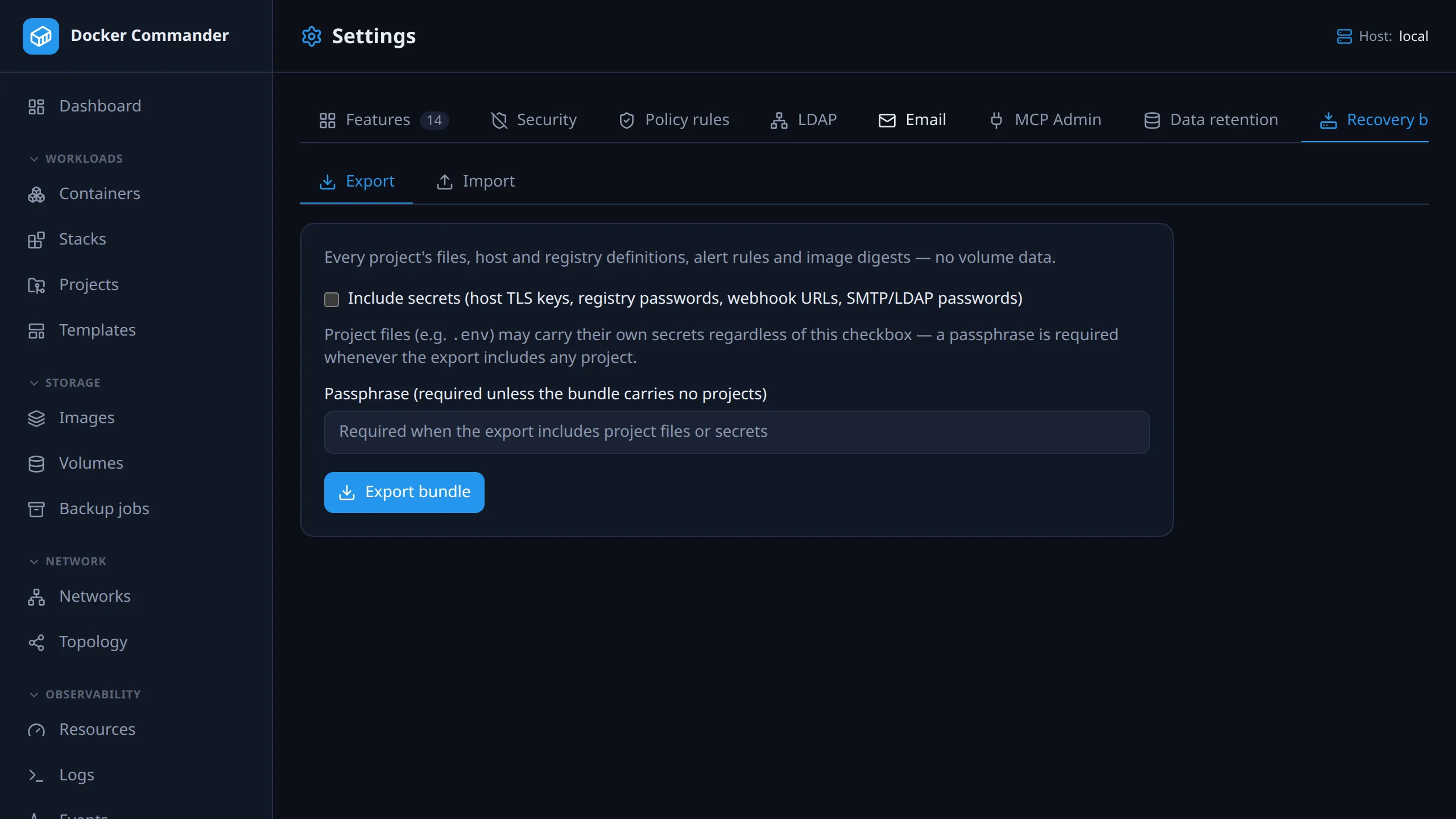
Open Settings → Recovery bundle (/settings?tab=recovery) and use the
Export and Import sub-tabs. Admin only.
Common tasks
Section titled “Common tasks”Move your setup to a new server. On the old one, tick Include secrets, set a passphrase and click Export bundle. On the new one, choose the file, enter the passphrase, pick the Target host, click Check compatibility, then Import. Projects are created but not deployed. Pull missing images and deploy them when ready.
Keep a config copy without credentials. Export without Include secrets.
You still need a passphrase if any project is included, because project files
such as .env may hold secrets anyway. After import, re-enter registry
passwords and host TLS keys.
What the passphrase protects. It encrypts the whole bundle (AES-256-GCM, key from Argon2id). Without it, a bundle with Include secrets holds every credential in plain text. A lost passphrase cannot be recovered.
What is in a bundle
Section titled “What is in a bundle”| Included | Notes |
|---|---|
| Projects | name, slug, compose file name, target host (by name), “allow remote host paths” opt-in, last-deployed profiles, every file in the project folder |
| Project image digests | image and running digest per service, for the compatibility check |
| Project secrets | names always; values only with Include secrets |
| Domain mappings | domain, service, port, TLS mode |
| Hosts | every non-local host: TLS CA/certificate, SSH host key, alert e-mail, disabled flag. TLS key only with Include secrets |
| Registries | name, address, username. Password only with Include secrets |
| Alert rules | with per-rule e-mail recipients and the webhook (by name) |
| Webhooks | only with Include secrets, because a webhook URL is a credential |
| Instance settings | disabled sections, localhost 2FA exemption, SMTP, LDAP. Passwords only with Include secrets. LDAP group mappings are never included |
| Inventory | names of the local host’s networks and volumes, to report what is missing on the target |
Not included: volume data, users and roles, API/MCP tokens, the audit log, policy rules, backup jobs, retention settings and project revision history. For a full copy of Docker Commander itself (database, encryption key, projects and revision snapshots), use the command-line backup. Volume data is in neither: back it up with a backup job.
Limits: 500 projects. Per project, 100 files of up to 1 MiB each; larger
files are skipped and symbolic links are not followed. 1 GiB of project files in
total: a bigger export fails whole (413). Import refuses a bundle with more than
1 GiB or 20,000 project files, or more than 5,000 hosts, registries, alert rules
or webhooks, before writing anything.
Export
Section titled “Export”- Include secrets adds host TLS keys, registry passwords, webhook URLs, SMTP/LDAP passwords and project secret values. Off by default.
- Passphrase encrypts the bundle. It is required when the export contains any project; the server refuses an unencrypted export with projects. Without projects it is optional, but set one whenever you include secrets.
Export bundle downloads docker-commander-recovery-YYYY-MM-DD.dcbundle. The
UI exports all projects; the API can export a subset with projectIds.
Import
Section titled “Import”- Choose the
.dcbundlefile, enter the passphrase if it is encrypted, and pick the Target host (Local by default). - Check compatibility writes nothing. It reports:
- the bundle’s contents: export time, exporter, counts of projects, hosts, registries and alert rules, and whether secrets are included;
- images missing on the target host, matched by repository, and by digest if one was recorded;
- volumes missing on the target;
- projects whose host is neither in the bundle nor already configured;
- a warning if the bundle has no secrets but carries hosts or registries, so registry passwords and host TLS keys must be re-entered.
- Import is enabled only while the file, passphrase and target host match the last check. Change one and check again. A confirmation follows.
Also apply the bundle’s instance settings applies disabled sections, the localhost 2FA exemption, SMTP and LDAP. Off by default.
What import does:
- Nothing is overwritten. Hosts, registries, webhooks and alert rules match by name, projects by slug. Existing items are skipped with a warning, so importing twice creates no duplicates. An existing webhook is reused without a warning, and imported rules link to it.
- Projects are created, not deployed. Files are checked with Compose first; a project that fails the check is skipped with a warning.
- Hosts match by name across the bundle and the configured hosts. A project on the local host, or whose host isn’t found, goes to the Target host. A missing host gives a warning.
- Secrets are restored only if the bundle has the value. Otherwise you get a warning; add the secret before deploying.
- Domain mappings are restored with the same checks as in the UI: a valid
hostname, not the admin UI’s own domain, a service that exists in the compose
file, a port from 1 to 65535, TLS mode
acme. A mapping that fails one, or a domain already mapped, is skipped with a warning. - Alert rules are recreated with their recipients and linked to webhooks by name.
The summary lists what was created, then every warning.
Safety and audit
Section titled “Safety and audit”- The
/api/recovery/*API is admin-only and can’t be granted per section. - A missing passphrase gives “this archive is encrypted; a passphrase is required”. A wrong one gives “could not decrypt — wrong passphrase, or the archive was modified”.
- A recovery bundle can’t be restored as a full backup, and the reverse.
- Import rejects unknown manifest fields, unsupported versions and a disabled target host. Project files whose path leaves the project folder are skipped without a warning.
- The audit log records
recovery.export(number of projects, whether secrets were included),recovery.inspectandrecovery.import(projects created, host, registry and rule counts).
Technical notes
Section titled “Technical notes”- The bundle is a zip (
manifest.jsonandprojects/<slug>/…) inside a versioned envelope (version 1). Encryption is AES-256-GCM with an Argon2id-derived key.