
Users & roles
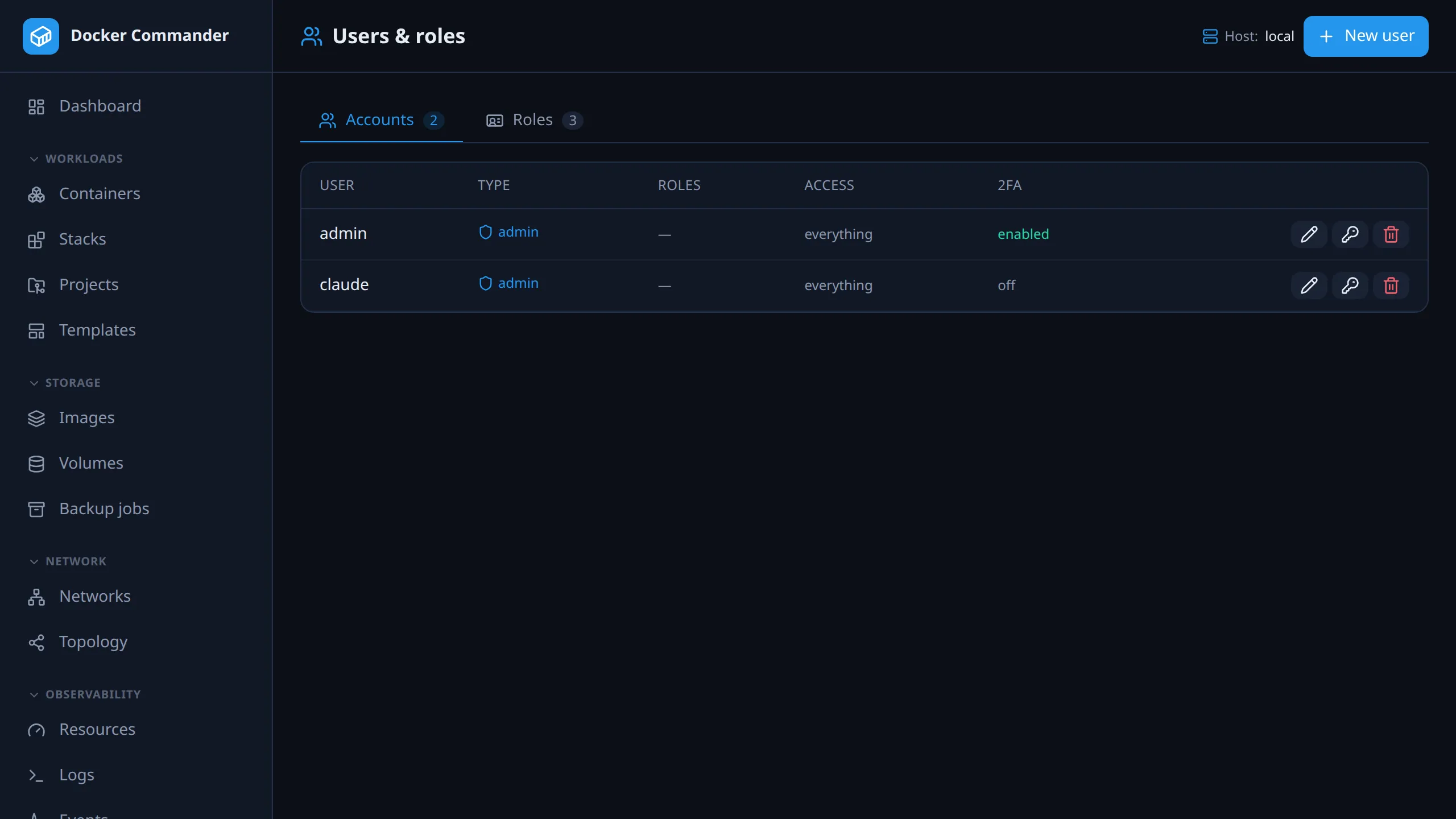
Admin only. Create accounts and decide what each one can do, on which hosts. To see your own access or manage your own sign-in, use Your profile.
Common tasks
Section titled “Common tasks”Give a colleague read-only access to one remote host’s containers. On Roles, click New role, set Containers to read and pick that host under Hosts. Then create the user on Accounts and assign the role. The local daemon is always in scope too (see below). Don’t also tick Containers among the account’s own sections: those carry no host scope and would reach every host.
Make a role that is almost Operator. Built-in roles can’t be edited. Click Duplicate on Operator, then change the copy. Members of the original are not affected.
Take access away now. Use Edit access to remove the role or section. It applies on the user’s next request, because nothing is cached in their session.
Make someone read-only everywhere. Tick the account’s read-only flag. It caps every grant to reads, and no writable role can lift it.
Reset a forgotten password. Use Reset password. It also signs the user out of every session. Their second factor stays as it is: no admin can reset another account’s 2FA, so they still need their authenticator or passkey.
Let the directory decide access. Map LDAP groups to roles in Settings → LDAP. See Roles from LDAP groups.
Account types
Section titled “Account types”| Type | Access |
|---|---|
| admin | Everything, plus administration: users, roles, settings, all hosts. |
| user | Only what you grant. Can be marked read-only for the whole account: it can view, but every change (start/stop, exec, upload, delete, create…) is blocked. So are the reads that hand over raw content or act on the network: container export, file downloads from containers and volumes, image save, pull, push, vulnerability and port scans. |
Managing accounts
Section titled “Managing accounts”- New user: username, password (at least 10 characters), account type, read-only flag, any roles, and optional per-account sections (checkboxes matching the menu).
- Edit access: change type, read-only, roles or sections later. Revoking a role is immediate.
- Reset password: set a new password. All of the user’s sessions end.
- Delete: you can’t delete your own account or the last admin. You also can’t demote the last admin.
The account list shows each account’s type (admin, read-only, user, or user · view only when nothing it holds grants write) and, on wide screens, a 2FA column: enabled (authenticator app), passkey (passkey only) or off.
New accounts must set up 2FA. An account you create, or an LDAP account on first sign-in, has no second factor. Unless the localhost 2FA exemption applies, its first sign-in goes straight to Enable two-factor authentication: scan the QR code (or enter the secret by hand) and confirm with a code.
A role is a reusable set of section grants, so you don’t tick fourteen checkboxes per account. Each section in a role is read-only or writable, which is finer than the account-level read-only flag.
Two roles are built in. They can’t be edited; Duplicate one to get an editable copy, as with project templates.
| Role | Grants |
|---|---|
| Viewer | Every section, read-only. |
| Operator | Day-to-day work, writable: dashboard, containers, projects, images, volumes, networks, topology, logs, events, alerts, diagnostics. Not hosts, registries or the audit log. Those are authority over the installation itself. |
Write access to Containers or Projects is full trust in the server. Access to a Docker daemon is equivalent to root on its machine: whoever can start a container or deploy a project can run a privileged one and read that machine’s files. The local daemon is in every role’s reach, even a role limited to other hosts, so on a typical install this includes the Docker Commander server itself, its data dir and encryption key. Give these grants only to people you would give root on the server.
Manage roles on the Roles tab. Each card shows the role’s grants, how many accounts hold it, whether it is limited to specific hosts, and whether it is built in or yours. The editor shows all fourteen sections, each set to — (not granted), read or write. Built-in roles open read-only.
A user can hold several roles and still have per-account sections on top. The effective access is the union, so the more permissive grant wins.
Only an admin can create, edit or assign roles. Anyone who could edit a role could widen their own access, so no combination of section grants reaches role management.
Limiting a role to specific hosts
Section titled “Limiting a role to specific hosts”A role can be limited to a set of Docker hosts. Then “may restart containers” can mean “on staging, not production”. Pick the hosts in the role editor.
- An empty host list means every host. Existing roles and accounts keep the reach they had before scoping existed, and a new role isn’t silently scoped to nothing.
- The local daemon is always in scope. Otherwise a single-host install could lock itself out of its own Docker.
- Scope is per grant, and grants combine. With Operator on staging and Viewer everywhere, you read everywhere but change only staging. Sections granted directly on the account have no scope and reach every host.
- The read-only flag still caps everything. Scope decides where, not what.
The user’s profile shows the resulting reach per section under Where.
Scoping hides as well as blocks. A host outside your scope doesn’t appear in the host list. Its projects aren’t listed, its alerts don’t reach your feed or the unread badge, and its entries don’t appear in the audit log. A container’s metrics history is refused even if you know the container id. Per-host views (dashboard counts, disk usage, published ports, topology, the events feed) are each checked against the host they name.
Roles from LDAP groups
Section titled “Roles from LDAP groups”A group mapping in Settings → LDAP grants roles to members of an LDAP group, matched on the group’s full DN. Older configs may also grant raw sections. A user’s access is the union over every mapped group they belong to. It is recalculated on each login, so a group change in the directory applies the next time they sign in. That includes a role being taken away.
What a mapping cannot do:
- Make anyone an admin. Only the configured admin group DN does that. A role can’t contain role management either, so no mapping hands out the keys.
- Lock anyone out by referencing a deleted role. A stale role id grants nothing, or the fallback role if you set one.
The fallback role
Section titled “The fallback role”Pick one in Settings → LDAP. It is granted in place of a mapped role that no longer exists. Deleting a role then drops its members to a known baseline (Viewer is the obvious choice) instead of leaving them with no access.
- It does not apply to a user whose groups map to no role at all. That is the normal “not entitled” case, and a baseline there would give a role to every account in the directory that can sign in. The fallback covers a broken mapping, not an absent one.
- It is added only when at least one mapped role no longer exists, next to the mapped roles that still do. If every mapped role exists, no fallback is added.
- The built-in roles can’t be deleted. Neither can the role currently set as the fallback; point the fallback elsewhere first.
Whether the directory owns roles depends on whether your mappings use them:
| Your mappings | What a login does |
|---|---|
| No mapping grants a role | Roles assigned by hand on the account are left alone. |
| Any mapping grants a role | Roles are replaced by what the groups grant. Hand-assigned ones are dropped. |
This keeps an upgrade from stripping roles on installs whose mappings predate roles. Once you map a role anywhere, assign roles in the directory, not per account. Sections work differently: as soon as any mapping exists, group membership decides a non-admin’s sections, and manual edits are overwritten on the next login.
LDAP users are created here automatically on first login, as
user, oradminif they are in the admin group. Grant access by hand, or use group mappings.
Technical notes
Section titled “Technical notes”Where it is enforced. Every request is checked on the server. The path maps to a section, and a non-admin must hold that section, with write access for changes. The menu hides what you can’t reach. Sections an admin disabled app-wide are hidden from everyone’s menu and blocked for everyone except admins.
Order of rules, which matters when they disagree:
- admin bypasses section, read-only and host checks.
- Grants are the union of the account’s roles and its own sections.
- The account’s read-only flag caps everything to reads. A writable role can’t lift it.
- An app-wide disabled section is removed next, so a role can’t re-enable a feature an admin turned off.
- The grant’s host scope is checked last. The right section on the wrong host is a 403.
Records addressed by id. A project, a host record or an alert is checked against the host stored in the record itself. Ids are sequential, so knowing one buys nothing: a record you can’t reach answers exactly like one that doesn’t exist. Seeing and changing stay separate, though. A read-only grant on a project you can see gets 403, not 404, because pretending it vanished would only mislead you.
Live stream. The live stats/logs WebSocket (/api/ws) is checked per
channel and host. Both the stats and logs streams need the
containers section. Each subscribe message names its host, so streaming a
container on a host outside your scope is refused there too.
What scoping doesn’t cover: alert e-mail. The alert engine watches every host by design. It is background work with no user attached. If a rule lists you as an e-mail recipient, you can get mail about a host you can’t see in the app. Choose each rule’s recipients with that in mind.