
Audit log
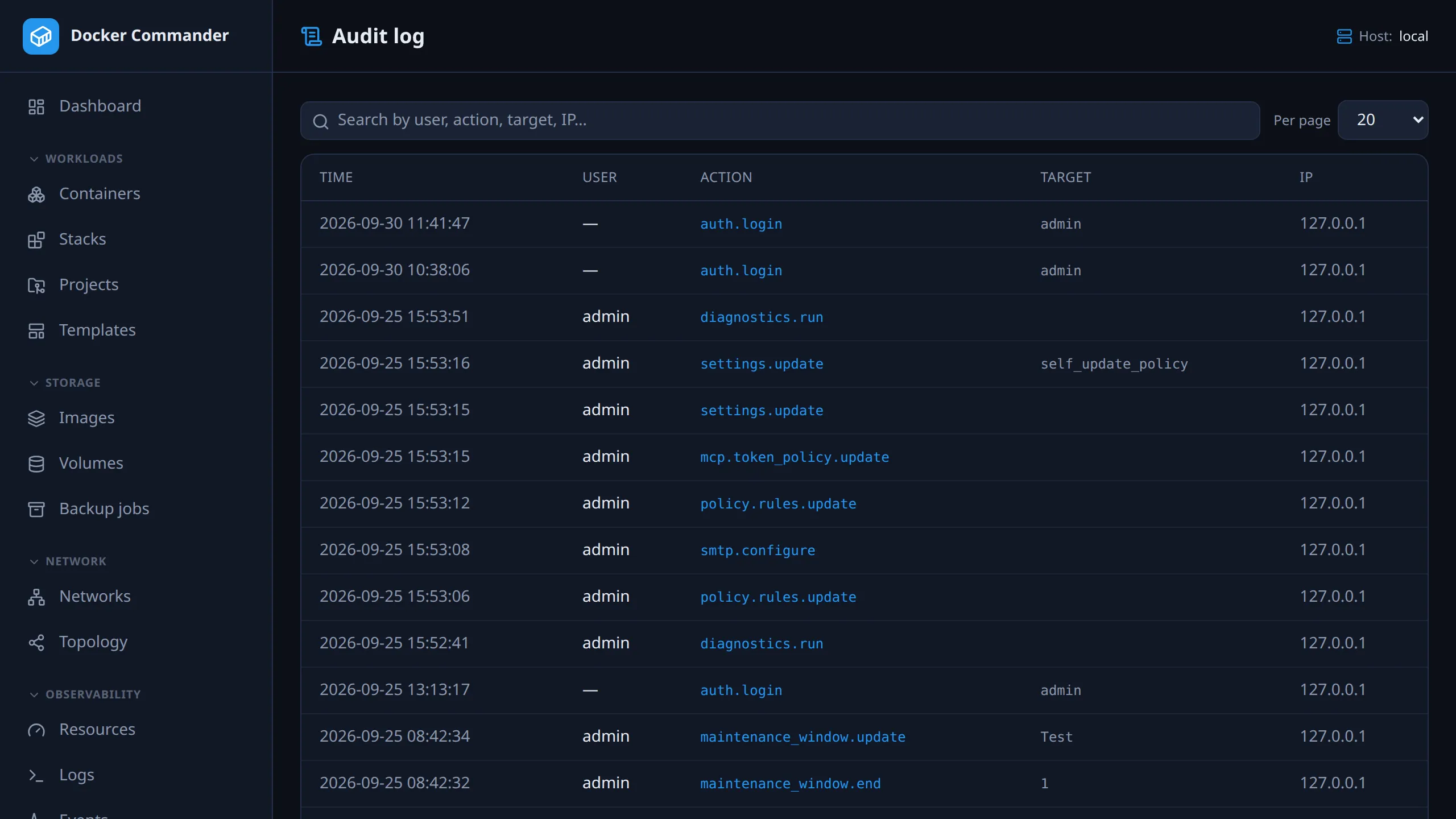
A record of changes and security-relevant actions: who did what, when, from where and on which host. For what Docker itself did (a container dying, an image pulled by something else), use Events.
Common tasks
Section titled “Common tasks”Find who stopped a container. Search for the container’s id: the target is
the id, not the name, and the first 12 characters are enough. Look for
container.stop or container.kill, or mcp.container.stop if an AI client did
it. For the mcp.container.* actions the target is whatever the client passed,
which may be a name or a short id. A container stopped with its stack shows as stack.stop or project.down,
with the stack or project as the target.
Check a sign-in you don’t recognise. Search for auth.. Every completed
sign-in is an auth.login. A run of auth.2fa.failed means someone has the
password but not the second factor: change the password (Profile → Account). Treat any
auth.passkey.cloned as serious.
See who changed the configuration. Search for settings.update,
ldap.configure, smtp.configure, retention.update or policy.rules.update.
See what happened on one server. Type the host’s name into the search. The Host column names the server each action reached.
See what AI clients have done. Search for mcp.. Changes a client makes
through MCP are recorded under that prefix, as are token changes. What
it only reads is not.
Keep entries longer. Entries older than 365 days are deleted by default. Change it in Settings → Data retention. The minimum is 30 days.
The page
Section titled “The page”The newest 1000 entries you may see, newest first, with search and paging. Columns are time, user, action, target, host and IP. An entry’s detail (how a sign-in happened, which profiles a deploy used…) is shown under its target. The search covers user, action, target, detail, host name and IP.
The Host column is the Docker host the action reached:
| Shows | Means |
|---|---|
| a host name | The action ran on that host. The local daemon is shown by its own name too. |
#id |
A host you can’t see, or one deleted since. Its name isn’t shown. |
several hosts |
Something spanning more than one host, or all of them: a maintenance window for several hosts, acknowledging all alerts across hosts. |
— |
An action with no host, such as a settings change. Entries from before 1.7.0 also show this for the local daemon. |
Read-only views (listing, inspecting, streaming) are not audited. Only changes and security-relevant operations are, which keeps the log useful.
Sign-in and second factors
Section titled “Sign-in and second factors”The auth.* actions are the ones to read when something feels wrong.
| Action | Means |
|---|---|
auth.setup |
The first admin account was created. Should appear exactly once, on first run. |
auth.login |
A completed sign-in. The detail says how: password only, password + 2fa, password + passkey, or passkey (passwordless). |
auth.login.failed |
A sign-in that got as far as a valid signature and was then refused: a passkey that did not verify the user, or an account that has not enabled passwordless sign-in. |
auth.2fa.failed |
A rejected second factor. |
auth.2fa.enable / auth.2fa.repair.denied |
An authenticator paired / a pairing refused: a wrong password, or an enrolment started before the account got its current second factor. |
auth.2fa.remove / auth.2fa.remove.denied |
An authenticator unpaired / an unpairing refused. Removing one needs the password, and the last one can’t be removed at all. |
auth.password.change / auth.password.change.denied |
Own password changed from Profile → Account, which ends every other session / a change refused for a wrong current password. |
auth.session.revoke |
A signed-in session was ended from Profile → Security. |
auth.passkey.add / auth.passkey.add.denied |
A passkey paired / refused. |
auth.passwordless / auth.passwordless.denied |
Signing in with a passkey alone turned on or off / refused for a wrong password. |
auth.passkey.cloned |
Read this one. A passkey’s signature counter went backwards, which is what a copied credential looks like: the same key answering from two places. The sign-in is refused. One entry can be a quirky authenticator; a pattern is not. |
Failures before a signature verifies are deliberately not attributed to an account. Until the signature is checked, the user handle in a sign-in attempt is chosen by the client. Naming it would let anyone write failed-sign-in lines against a username they guessed.
Every action, by area
Section titled “Every action, by area”All 185 of them, generated from the source and kept in step with it by a
test: an audited action with no entry here fails the build, and an entry the code
never writes fails it too. The auth.* table above explains the ones worth reading
when something feels wrong; this is the complete set, for looking up what you found
in the log.
Sign-in and second factors — auth.2fa.enable, auth.2fa.failed, auth.2fa.remove, auth.2fa.remove.denied, auth.2fa.repair.denied, auth.login, auth.login.failed, auth.passkey.add, auth.passkey.add.denied, auth.passkey.cloned, auth.password.change, auth.password.change.denied, auth.password.reset, auth.passwordless, auth.passwordless.denied, auth.session.revoke, auth.session.revoke_others, auth.setup
Accounts — user.create, user.delete, user.email, user.password_reset, user.update
Roles — role.create, role.delete, role.duplicate, role.update
Containers — container.commit, container.cp.download, container.cp.extract, container.cp.upload, container.create, container.exec, container.export, container.file.delete, container.file.mkdir, container.kill, container.pause, container.probe, container.rename, container.restart, container.start, container.stop, container.unpause, container.update
Stacks — stack.compose.write, stack.redeploy, stack.redeploy.failed, stack.remove, stack.restart, stack.start, stack.stop
Projects — project.create, project.delete, project.deploy, project.deploy.policy_block, project.deploy.policy_check_failed, project.deploy.policy_warn_ack, project.dir.create, project.domain.create, project.domain.delete, project.domain.update, project.down, project.drift.ignore, project.drift.unignore, project.file.delete, project.file.download, project.file.upload, project.file.write, project.import, project.remote_host_paths, project.rename, project.restart, project.retarget, project.revision.restore, project.revision.restore.policy_block, project.revision.restore.policy_check_failed, project.revision.restore.policy_warn_ack, project.secret.create, project.secret.delete, project.secret.update, project.seed_volumes.remove
Project templates — project_template.create, project_template.delete, project_template.dir.create, project_template.duplicate, project_template.file.delete, project_template.file.download, project_template.file.upload, project_template.file.write, project_template.update
Service blocks — service_block.create, service_block.delete, service_block.duplicate, service_block.update
Shared definitions — compose_fragment.create, compose_fragment.delete, compose_fragment.duplicate, compose_fragment.update
Images — image.build, image.cve.ignore, image.cve.unignore, image.import, image.load, image.prune, image.pull, image.push, image.remove, image.save, image.scan, image.tag
Volumes — volume.cp.download, volume.cp.extract, volume.cp.upload, volume.create, volume.file.delete, volume.file.mkdir, volume.prune, volume.remove
Networks — network.connect, network.create, network.disconnect, network.prune, network.remove
Hosts — host.create, host.delete, host.ports.scan, host.trust, host.update
Diagnostics — diagnostics.run
Registries — registry.create, registry.delete
Alert rules — alert_rule.create, alert_rule.delete, alert_rule.update
Alert rules (bulk) — alert_rules.export, alert_rules.import
Alerts — alert.ack
Maintenance windows — maintenance_window.create, maintenance_window.delete, maintenance_window.end, maintenance_window.update
Log parse rules — parse_rule.create, parse_rule.delete
Webhooks — webhook.create, webhook.delete
Settings — settings.update
Policy rules — policy.rules.update
Data retention — retention.update, retention.purge (a purge is recorded only when it deleted something or failed)
LDAP — ldap.configure
Email — smtp.configure
MCP (AI-tool access) — mcp.admin.oauth_client.delete, mcp.admin.session.revoke, mcp.admin.token.revoke, mcp.alert.ack, mcp.container.restart, mcp.container.start, mcp.container.stop, mcp.diagnostics.run, mcp.image.scan, mcp.maintenance_window.create, mcp.maintenance_window.end, mcp.oauth.authorize, mcp.project.deploy, mcp.project.down, mcp.ratelimit, mcp.session.revoke, mcp.stack.restart, mcp.stack.start, mcp.stack.stop, mcp.token.create, mcp.token.revoke, mcp.token_policy.update
Self-update — update.apply, update.restart
Recovery bundle — recovery.export, recovery.import, recovery.inspect
Backup jobs — backup_job.create, backup_job.delete, backup_job.disable, backup_job.enable, backup_job.run, backup_job.update
Technical notes
Section titled “Technical notes”- Host scope. A reader whose roles are limited to some hosts sees only
entries for those hosts, the local daemon (always in reach) and actions with no
host. Entries about several hosts are shown only to readers who see every
host. The scope is applied in the query, before the 1000-entry limit, so a busy
host you can’t see never pushes your own entries out. The MCP
recent_audittool applies the same scope, narrowed further by the token’s own hosts. - How the host is known. It is the host the action actually reached, with “no host chosen” resolved to the concrete default. A project action names the project’s host, a backup job its job’s host, a host setting that host. An MCP call aimed at a remote host names it even when it was refused before it got there. Entries written before 1.7.0 recorded the local daemon, project actions and MCP actions without a host; they can’t be corrected.
- Who can read it. The audit log is its own section. Viewer includes it read-only; Operator does not (see Users & roles).
- Older entries. The page loads only the newest 1000. The API,
GET /api/audit, takeslimit(up to 1000) andbefore(an entry id) to page further back. Each entry carrieshostId:0for no host,-1for several.