
Hosts
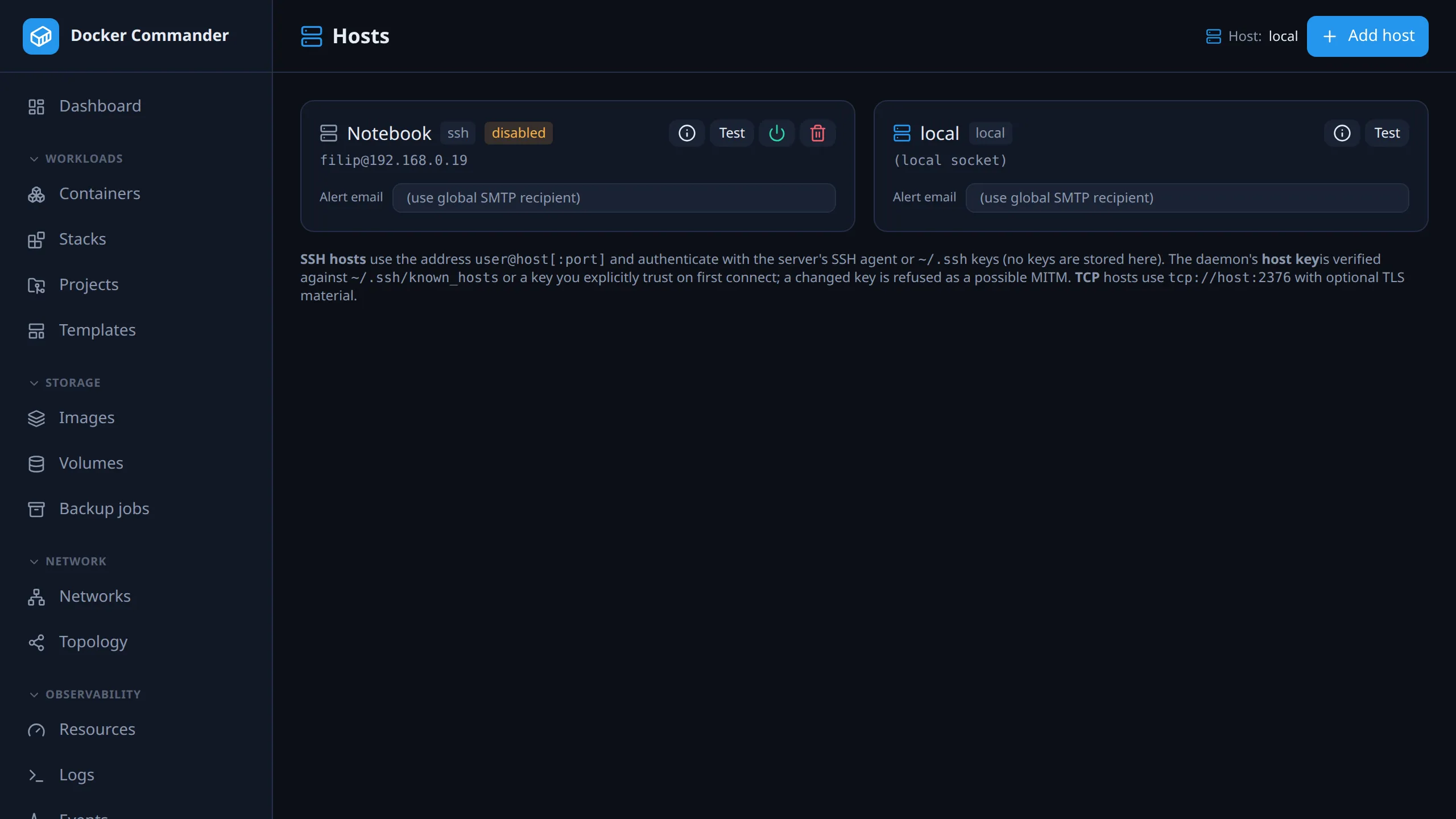
The Docker daemons Docker Commander talks to. The local host exists out of the box; add remote ones over SSH or TCP and switch between them in the sidebar. Every view and stream binds to the selected host, while the alert engine watches all of them.
Common tasks
Section titled “Common tasks”Add a server over SSH. As the OS user that runs dockercmd, install an SSH
key on the server and check that ssh user@server docker info works without a
password. Then click Add host, keep the type SSH, enter a name and
user@server, and save with Add host. Click Test on the new card,
compare the fingerprint with the server’s own and click Trust this host.
The commands are under Connecting over SSH.
The host key changed. Test shows Host key CHANGED — possible MITM and the connection is refused. If you reinstalled or rebuilt the server yourself, verify the new fingerprint and click Re-trust new key. If you didn’t, don’t: this is exactly what an attack looks like.
A server will be offline for a while. Click the power button on its card to disable it. The monitor stops trying to reach it, so there are no retries, errors or unreachable alerts. Click it again when the server is back.
Send one host’s alerts to a different address. Type it into Alert email on the host card and click Save. It replaces the global recipient for alerts from that host, unless the alert rule lists its own recipients.
Deploys work, but the dashboard stays empty. The remote sshd probably has
AllowTcpForwarding no. Deploys don’t need forwarding, everything else does.
See Connecting over SSH.
A host you know exists is missing. Gone from the switcher only: it is disabled. Not on this page either: it is outside your host scope, since the list, the switcher and every per-host view only show hosts your grants reach. See Users & roles.
Adding a host
Section titled “Adding a host”| Type | Address | Credentials |
|---|---|---|
| SSH | user@host[:port] |
The server’s own SSH agent or ~/.ssh keys. No key material is stored here. The Docker API is tunnelled over SSH to /var/run/docker.sock on the remote host; other socket paths (rootless Docker) aren’t supported. |
| TCP | tcp://host:2376 |
Optional CA, client certificate and key (PEM) for TLS. |
You can also set an alert email for the host, at creation or later on the host card. It overrides the global SMTP recipient for alerts from that host, but not recipients set on the alert rule itself.
The remote server only needs Docker installed and reachable. It does not need Docker Commander. One instance talks to many Docker daemons, never to another Docker Commander.
Connecting over SSH
Section titled “Connecting over SSH”SSH is the recommended way. Nothing is exposed to the network and no secrets
are stored here: the Docker API is tunnelled using the SSH keys of the OS
user that runs dockercmd.
On the Docker Commander server, as that user:
# 1. Have an SSH key (skip if you already do) and install it on the remote host:ssh-keygen -t ed25519
# 2. Sanity check — this must succeed WITHOUT a password prompt:On the remote host, let the SSH user reach the Docker socket:
sudo usermod -aG docker deploy # then reconnect so the group takes effectThen Hosts → Add host, type SSH, a Name, address
[email protected] (or deploy@host:2222 for another port), and Add host.
On the new card click Test, and Trust this host after verifying the
fingerprint (see SSH host keys).
-
Which keys are used. Keys from the agent (
SSH_AUTH_SOCK) first, then~/.ssh/id_ed25519,id_rsaandid_ecdsa.~/.ssh/configis ignored, so aHostalias,User,PortorIdentityFilethere has no effect: put the realuser@host[:port]in the address. Thesshsanity check above can pass through your config while the app fails. -
Passphrase-protected key. Key files with a passphrase are skipped. Make an agent available to the
dockercmdprocess, e.g. a systemd service withSSH_AUTH_SOCK, or use a key without a passphrase. -
Many keys in the agent.
sshdmay reject them all and hitMaxAuthTries(default 6) before the right one. Prune the agent, or givedockercmdan agent that holds only the key it needs. There is no per-host key setting. -
The remote
sshdmust allow forwarding. The tunnel is an SSH channel, whichsshdgates onAllowTcpForwarding. Withno, connections fail withssh: rejected: connect failed. Most distributions default toyes; Alpine shipsno.sshdhonours the first occurrence of a keyword, so a line appended tosshd_configcan be silently ignored. Check the effective value withsshd -T | grep -i allowtcpforwarding. -
Half-working host.
docker composeuses its owndial-stdiochannel, which needs no forwarding. So without forwarding a Projects deploy can succeed while monitoring and everything else fails.
Connecting over TCP + TLS
Section titled “Connecting over TCP + TLS”Prefer SSH: it exposes no extra port. Use TCP only when SSH really isn’t possible.
The Docker daemon socket is root-equivalent. Anyone who can reach it can mount the host filesystem and run privileged containers, i.e. become root on that machine.
- Never expose plaintext
2375. That is an open root shell. 2376must use mutual TLS (--tlsverify). A leaked client cert is a root credential; guard it like one.- Even with TLS, keep
2376off the open internet. Use a private network or VPN (e.g. WireGuard), or a firewall allowlist for the Docker Commander server’s IP, and bind the daemon to that interface, not0.0.0.0.
- On the remote host, enable a TLS-protected TCP listener on
:2376and create a CA, server and client certificates, following Docker’s guide: https://docs.docker.com/engine/security/protect-access/. - In the UI: Hosts → Add host, type TCP (+TLS), a Name, address
tcp://10.0.0.42:2376, and paste the CA cert, Client cert and Client key (PEM). Save with Add host, then Test on the card.
Sanity check from the Docker Commander server:
docker --tlsverify --tlscacert=ca.pem --tlscert=cert.pem --tlskey=key.pem \ -H tcp://10.0.0.42:2376 infoSwitching the active host
Section titled “Switching the active host”With more than one enabled host, a Viewing host switcher appears at the top of the sidebar. Disabled hosts are left out of it. Picking a host rebinds the whole app: dashboard, containers, images, logs, stats, exec. Nothing is mixed across servers. The active host is shown as a badge in every page header, and your browser remembers the choice.
Host card
Section titled “Host card”| Control | What it does |
|---|---|
| Info (i) | Hardware, OS and engine: hostname, CPUs, memory, architecture, OS, OS type and version, kernel, Docker version, storage and logging drivers, cgroup, live restore, root dir, container and image counts. |
| Test | Probes the host, with a short timeout so an unreachable one fails fast. Reports the Docker version and running count, or the connection or host-key problem. |
| Power | Disables or enables the host (remote hosts only). |
| Delete | Removes the host (remote hosts only). |
| Alert email | Per-host alert recipient. |
Docker Desktop: the engine runs in a Linux VM, so the info describes that VM,
not the Windows or macOS machine. The Docker API can’t see the real OS. The
kernel is the best hint, e.g. …-WSL2 means Windows/WSL2.
Reachability monitoring
Section titled “Reachability monitoring”Besides the on-demand Test, the monitor pings every enabled host every 30 seconds. An unreachable daemon gets a red unreachable badge on its card and in the host switcher. It clears once the daemon answers again.
A change of state also raises an alert, with no alert rule needed:
- going offline fires a critical event,
- recovery fires an info event that says how long the host was down.
Both land in the alerts feed and, if SMTP is set up, are e-mailed to the host’s own Alert email, or else the global recipient.
- Recovery is automatic. A failed probe drops the cached connection, so the next sweep dials afresh instead of reusing a socket that died with the peer.
- No alert at startup. The very first probe never alerts. A host already down when the server boots stays quiet until its state actually changes.
- Disabled hosts are not probed and never show the badge.
Disabling a host
Section titled “Disabling a host”A disabled host is ignored by the monitor: no Docker events stream, no stats sampling. It leaves the host switcher, and its cached connection is dropped so nothing keeps reaching for it. This is the clean way to handle a host that’s offline on purpose, like a laptop put away or a server in maintenance, instead of letting the monitor retry and log errors. Re-enable it with the same button.
SSH host keys
Section titled “SSH host keys”The daemon’s host key is checked first against a key you trusted here, then
against ~/.ssh/known_hosts:
- Unknown (in neither): Test shows the SHA-256 fingerprint and a Trust this host button (trust on first use). Verify the fingerprint out-of-band before trusting.
- Changed (differs from the trusted key, or from the
known_hostsentry): refused as a possible man-in-the-middle. Re-trust only if you changed the host deliberately.
Remote alerting and metrics work without extra setup: the engine watches every configured host, and alerts say which host they came from. Don’t put a remote host into use until its host key is verified.